
Edit / Stamp
This section describes the settings in [Edit / Stamp] under [Copier / Document Server Settings].
Erase
Setting Items | Description |
|---|---|
Erase Border |
In [Erase Border] mode, you can specify the width for erasing the border within the range of 2 to 99 mm.
In [Erase Border] mode, you can specify the width for erasing the border within the range of 0.1 to 3.9 inches.
|
Erase Original Shadow in Combine | In Combine mode, you can specify whether to erase a 3 mm (0.1 inch) boundary margin around all four edges of each original.
Combining and Copying a Multi-page Original onto a Single Sheet of Paper |
 (mainly Europe and Asia)
 (mainly North America)
Margin Adjustment
Setting Items | Description |
|---|---|
Margin Adjustment Priority | You can specify the default settings for the margin within the range of 0 to 200 mm (0 to 7.9 inches). Specify a size for each of the top and bottom margins.
|
Stamp
This is applied when Background Numbering, Preset Stamp, User Stamp, Date Stamp, Page Numbering, or Stamp Text is specified.
Printing Date, Stamp, and Page Number When Copying
Background Numbering
This section describes the settings in [Background Numbering] on [Stamp]. This is applied when Background Numbering is specified.
Setting Items | Description |
|---|---|
Stamp Size Setting | You can specify the size of the numbers.
|
Density Setting | You can specify the density of the numbers.
|
Stamp Color Priority | You can specify the default for the stamp color.
|
Preset Stamp
This section describes the settings in [Preset Stamp] on [Stamp]. This is applied when Preset Stamp is specified.
Setting Items | Description |
|---|---|
Stamp Language | You can select the language of the message printed in Preset Stamp mode.
|
Stamp Language Priority | You can select the default stamp type that has priority.
|
Stamp Format | You can specify how each stamp is printed.
|
User Stamp
This section describes the settings in [User Stamp] on [Stamp]. This is applied when User Stamp is specified.
Setting Items | Description |
|---|---|
Program / Delete User Stamp | You can register logos or custom stamps with your favorite designs. You can also delete user stamps.
|
Date Stamp
This section describes the settings in [Date Stamp] on [Stamp]. This is applied when Date Stamp is specified.
Setting Items | Description |
|---|---|
Format | You can select the date format for Data Stamp mode.
|
Font | You can select the date stamp font.
|
Size | You can select the date stamp size.
|
Superimpose | You can have the date stamp printed in white when it overlaps black parts of the image.
|
Stamp Color Priority | You can specify the default for the stamp color.
|
Stamp Setting | Specify how the [Date Stamp] is printed.
|
Page Numbering
This section describes the settings in [Page Numbering] on [Stamp]. This is applied when Page Numbering is specified.
Setting Items | Description |
|---|---|
Stamp Format Priority | You can select the page number format that has priority, such as stamp type ("P1, P2..." or "Page 1, Page 2...").
|
Font | You can select the font in Page Numbering mode.
|
Size | You can select the size in Page Numbering mode.
|
Page Numbering in Combine | When you specify the [Page Numbering] and Combine functions, you can specify the Page Numbering: Per Original or Per Copy.
|
Stamp Position | You can specify the page number print position when [Page Numbering] is specified.
You can adjust the position in mm or inches. |
Superimpose | You can have the page number printed in white when it overlaps black parts of the image.
|
Stamp Color Priority | You can specify the default for the stamp color.
|
Page Numbering: Change Language | Specify the page numbering initial letter.
|
Stamp Text
This section describes the settings in [Stamp Text] on [Stamp]. This is applied when Stamp Text is specified.
Setting Items | Description |
|---|---|
Font | You can select the font in Stamp Text mode.
|
Size | You can select the stamp text size.
|
Superimpose | You can have the stamp text printed in white when it overlaps black parts of the image.
|
Stamp Color Priority | You can specify the default for the stamp color.
|
Stamp Setting | You can specify how the [Stamp Text] is printed.
|
Change Job Serial No. for First Job | You can specify whether to append a nine-digit serial number to the text.
|
Edit Image
Setting Items | Description |
|---|---|
Image Repeat Separation Line Double Copies Separation Line | You can specify whether to use a separation line when copying multiple pages on one side of the paper. You can select the type as well as the color from seven colors. Type (Solid, Broken A, Broken B, Crop Marks): 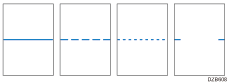 Selecting solid or broken lines might produce a blank area of approximately 1.5 mm (0.06 inches) in width along the separation line.
|
Partial Copy Size | You can specify the default settings of the start position (Y1) and the copy size (Y2).
|
Register/Delete Format (This setting item is enabled only when [Copier (Classic)] is used.) | You can register up to four format images for use with format overlay. |