
Copying Only the Specified Part
Use this function to copy only a specified length of the original (Partial Copy).
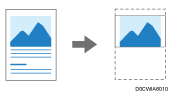
To specify the length you want to copy, you have to define the value of Y1 and Y2 on the original. The area of Y2 is copied.
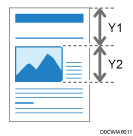
 Using a ruler, measure the scan start position (Y1) and the copy size (Y2).
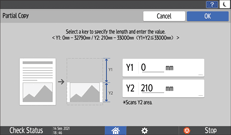
The minimum size (Y2) is 210mm (8.3 inches), and the maximum value of Y1 Y2 is 33000mm (1299.2 inches).
 Press [Copy] on the Home screen.

 Press [Partial Copy] on the Copy screen.
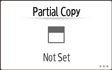
If the key is not found, select it from [Edit].
 Enter the values of the scan start position (Y1) and the size (Y2) of the area that you measured in Step 1, and then press [OK].
 Press the paper input select key, and then select the paper input location and paper size.
 Place the original.
Basic Procedure for Copying Documents
The original is fed into the machine automatically, and copying starts. If the original is not fed automatically, press [Start].

You can change the default value of Partial Copy under [Partial Copy Size].