
Copying One Original Image Twice on One Sheet
You can copy an original image twice and arrange it horizontally or vertically on a single sheet of paper (Double Copies).
For example, when copying an A4 (81/2 × 11)-size original onto multiple sheets, you can copy it on an A3 (11 × 17)-size sheet in Double Copies mode and cut the copied sheet to reduce the number of times copying is performed.

When the original size cannot be detected properly for Double Copies, specify the paper to use or paper size manually on the Copy screen.
For the original size detected automatically, see the following section:
Recommended Original Size and Weight

When you use the paper that loaded into the paper bypass location, you cannot use the Repeat function.
 Press [Copy] on the Home screen.

 Press [Double Copies] on the Copy screen.

If the key is not found, select it from [Edit].
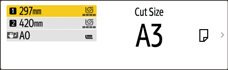
 Press the paper input location select key, and then select the paper input location and a preset cut size.
 Place the original.
Basic Procedure for Copying Documents
The original is fed into the machine automatically, and copying starts. If the original is not fed automatically, press [Start].
You can specify whether or not to print a separation line and the type of separation line by [Double Copies Separation Line].
You can specify the Double Copies function when the original size is A1 (D) or smaller (when A0 (E) paper is selected).