Combining and Copying a Multi-page Original onto a Single Sheet of Paper
You can copy multiple sheets in an original onto one side or both sides of a sheet of paper to save paper.

The arrangement of copied pages and copy ratio varies depending on the original orientation and combined pages.
Original Orientation |
Combine 2 pages |
Combine 4 pages |
Combine 8 pages |
|---|---|---|---|
|
|
|
|
|
|
|
|
|
|


Press [Copy] on the Home screen.

On the Copy screen, press [1 sided→Comb 2 orig].

To combine with the settings other than those displayed on the keys
Press [2 Sided/Combine].
Specify about the original side, print side, and combining.
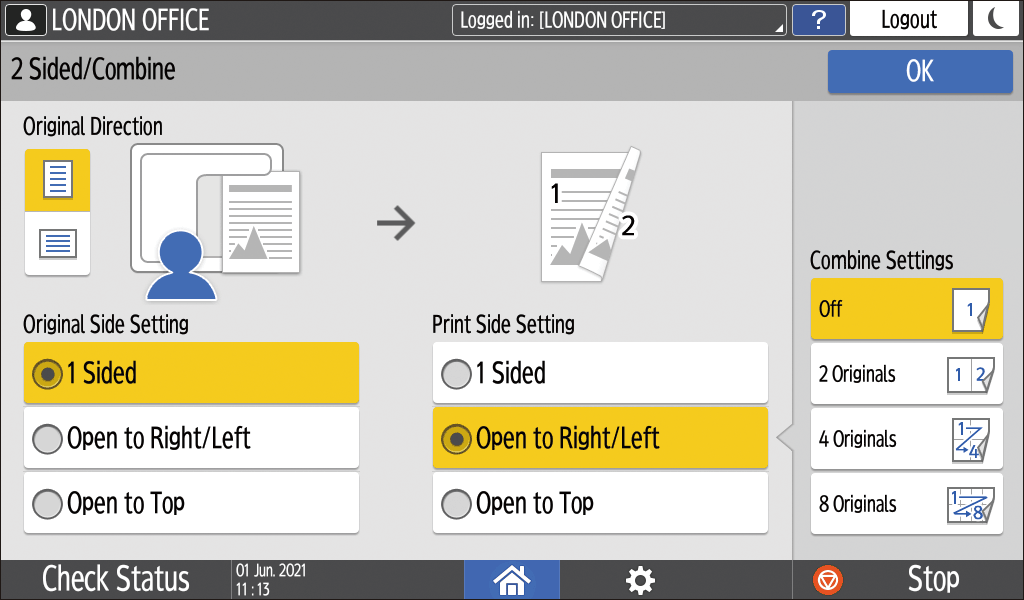
Original Direction: Specify the orientation to place the originals.
Original Side Setting: Specify the condition of the originals to copy (1 sided/2 sided (page opening direction)).
Print Side Setting: Specify the condition of the copied sheet (1 sided/2 sided (page opening direction)).
Combine Settings: Specify the number of pages to combine on one side of a sheet.
Press [OK].
Press the paper tray select key and select the paper to copy onto.
Place an original.
Basic Procedure for Copying Documents
To position the right-page first and then the left page when copying an original written longitudinally, place the original upside down in the ADF.
Example: Combining 2 PagesOrientation
Results


Press [Start].
When placing the originals on the exposure glass, press [Finish Scn] after scanning all of the originals if necessary according to the number of originals.

The minimum copy ratio in the Combine function is 25%. For example, if you copy an A3 (11 × 17)-size original onto A4 (81/2 × 11)-size paper with [1 sided→Comb 4 orig], the copy ratio becomes less than 25% and parts of the image might not be copied.
You can configure the following settings in [Settings]
 [Copier / Document Server Settings] [Combine/Book] [Combine]:
 [Copy Order in Combine]: The order of combined images
[Separation Line in Combine]: The separation line between combined pages
You can change the setting contents of the Combine key on the Copy screen.