Combine/Book
This section describes the settings in [Combine/Book] under [Copier / Document Server Settings].
Setting Items |
Description |
|---|---|
|
Copy Order in Combine |
You can select the copy order in Combine mode. When [From Left to Right] is selected: 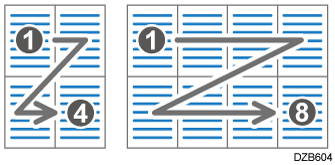
When [From Top to Bottom] is selected: 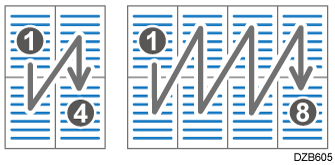
Combining and Copying a Multi-page Original onto a Single Sheet of Paper |
|
Separation Line in Combine |
You can specify whether to use a separation line when copying multiple pages on one side of the paper. You can select the type as well. Type (Solid, Broken A, Broken B, Crop Marks): 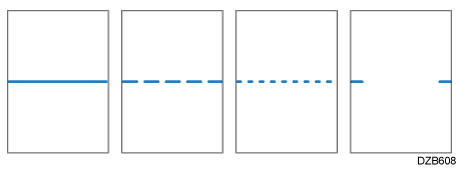
Selecting solid or broken lines might produce a blank area of approximately 1.5 mm (0.06 inches) in width along the separation line.
|
Setting Items |
Description |
|---|---|
|
Orientation: Booklet, Magazine |
You can select the opening orientation of copies made using Booklet or Magazine mode.
|