
Scanning an Original with the Colors Inverted
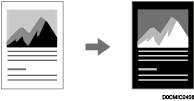
You can scan an original in the complementary colors with inverted density and brightness (Positive / Negative).
 Press [Scanner] on the Home screen.
 Press [Send Settings]
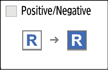
 [Positive/Negative] on the scanner screen.
 Specify the scan settings according to the purpose of the scanned data.
Scanning an Original with Suitable Quality and Density
Specifying the File Type or File Name When Scanning a Document
 To send the scanned document to an e-mail address, press [Sender] and then specify the sender.
 Specify the destination on the scanner screen.
 Place the original. If scanning does not start automatically, press [Start].