
Erasing Borders
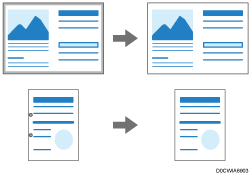
Erase the image from a specified width around the document when the document is scanned.

You cannot use this function in the following cases:
[Auto Detect] is selected as the scan size.
[Custom Size] is selected as the scan size and [Detect Y-length automatically] is selected.
 Press [Scanner] on the Home screen.
 Press [Send Settings]
 [Erase Border] on the scanner screen.
 Enter the width to erase and then press [OK].
 Specify the scan settings according to the purpose of the scanned data.
Scanning an Original with Suitable Quality and Density
Specifying the File Type or File Name When Scanning a Document
 To send the scanned document to an e-mail address, press [Sender] and then specify the sender.
 Specify the destination on the scanner screen.
 Place the original. If scanning does not start automatically, press [Start].