When a Banner Sheet Is Jammed
The solution varies according to where the jam occurs. See the reference that meets all conditions.
Condition |
Reference |
|---|---|
|
|
|
|
|
|
|
Removing Jammed Banner Sheets from the Internal Multi-Fold Unit |
|
Banner sheets are loaded into the banner paper guide tray that is attached to the bypass tray.
Slide the paper guides outward.

Push the lever on the right side of the machine up to open the right cover.
Open the right cover slowly while supporting it with your hand.
Open guide plate B.

Pull the paper downward to remove it from the underside of the fusing unit.

Close guide plate B.
Pull the paper that is fed between the machine and the duplex unit upward to remove it.

Close the right cover.
Remove the paper that was output.

When paper is jammed between the machine and the finisher, follow the procedure when paper is jammed in the machine instead of this procedure.
Removing Jammed Banner Sheets from the MachineOpen the internal multi-fold unit front cover.

Hold N4 and open the unit.

Open the N5 guide board.

Remove the misfed paper.

Close the N5 guide board.

Hold N4 and close the unit.

Close the front cover.
When the D1 is lit (bridge unit)
Remove the paper that was output.

When paper is jammed between the machine and the finisher, follow the procedure when paper is jammed in the machine instead of this procedure.
Removing Jammed Banner Sheets from the MachineRemove the misfed paper.

When the D2 is lit (bridge unit)
Open the bridge unit cover (left).

Remove the misfed paper.

Close the cover.
When the paper is jammed between the machine and the Finisher, remove the jammed paper from the machine before doing this procedure.
Removing Jammed Banner Sheets from the Machine
Pull the handle of the finisher to open the front cover.

Open the bridge unit or internal multi-fold unit.
When the bridge unit is attached
Open the bridge unit cover (left).

When the internal multi-fold unit is attached
Open the internal multi-fold unit front cover.
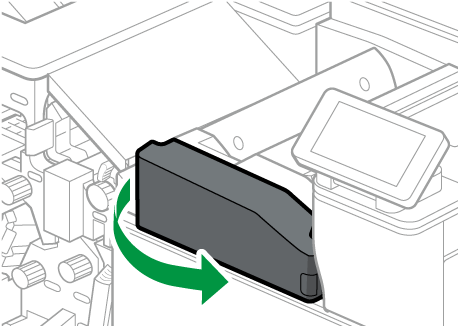
Hold N4 and open the unit.

Open the N5 guide board.

Remove the paper.
When the Finisher SR3340 is attached
Open the R1 guide board.

Rotate the finisher N2 counterclockwise.

When paper is jammed just in the Finisher SR3340, pull up R4.

Pull out the paper.

Close the finisher R1 guide board.

When the Finisher SR3320 or Booklet Finisher SR3330 is attached.
Rotate the knob counterclockwise.
When paper is jammed some place other than the Finisher SR3320 or Booklet Finisher SR3330 too, rotate the finisher R2 counterclockwise.
When paper is jammed in just the Finisher SR3320 or Booklet Finisher SR3330, rotate the finisher R3 counterclockwise, and then pull up the R4.

Pull out the paper.
When the bridge unit is attached
When the internal multi-fold unit is attached

Close the bridge unit or internal multi-fold unit.
When the bridge unit is attached
Close the bridge unit cover.
When the internal multi-fold unit is attached
Close the N5 guide board of the internal multi-fold unit.

Hold N4 and close the internal multi-fold unit.

Close the internal multi-fold unit front door.
Push the finisher front cover to close the finisher.
When the following conditions apply, remove the jammed paper from the bridge unit.
The Finisher SR3340 is attached to the machine and paper is jammed in the bridge unit.
The Finisher SR3320 or Booklet Finisher SR3330 is attached to the machine and paper is jammed between the machine and the bridge unit.
Removing Jammed Banner Sheets from the Bridge Unit