




 Previous
If a misfeed happens, remove the jammed paper by following the procedures stated in the animation that appears on the screen.
There is a section in the machine where the indicator is flashing. If you pull out the unit to remove the jammed paper while the indicator is still flashing, the paper may be ripped or pieces of torn paper may be left inside the machine.
When the indicator is flashing, open the guide board of the corresponding section to remove the jammed paper or turn the knob to move the paper along the feed path. Confirm that the indicator has stopped flashing, and then pull out the unit.
When flashing, indicators shows the following:
A2–A3: Paper is left in the source tray and around the guide board.
B1–B2: Paper is left somewhere between A and the drawer unit or between the LCT and the drawer unit.
D1: Paper is left between the drawer unit and the post-processing unit.
E: Paper is left in the turnover section.
C1, C2: The unit can be pulled out by moving the lever as indicated by the arrow.
A misfeed has occurred in the place corresponding to the letter displayed on the screen.
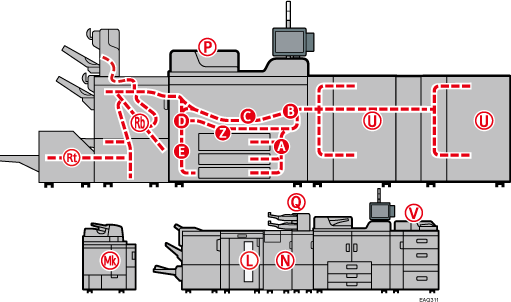

Multiple paper misfeed locations may be indicated at the same time. When this happens, check all the areas indicated.
If there is no misfed paper in the area you check first, see the other areas that are indicated.
If coated paper frequently becomes jammed and causes "U" to appear, contact your service representative.
If a paper misfeed occurs in Rb1 - Rb5, check whether any paper has been output on top of the paper press of the finisher shift tray. If there is paper on top of the paper press, remove the paper, and then remove the misfed paper from inside the finisher.


