
Printing on Synchro Cut
Cuts the paper at a suitable length for the document.
Specifying Synchro Cut (Windows)
 Open a document to print on the computer, and display the setting screen of the printer driver from the print menu in the application.
 In [Document Size:] on the [Basic] tab, select any one item from [Custom Paper Size (Roll A0)] to [Custom Paper Size (Sync. Cut)].
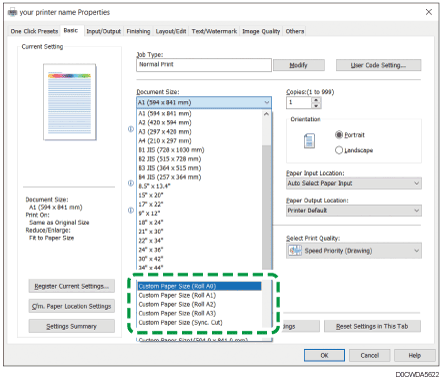
When you select [Custom Paper Size (Sync. Cut)], you can specify the width of the document in the [Synchro Cut Details...].
 Specify Paper Type, Orientation, and other settings.
 After completing the configuration, click [OK] to print.
Specifying Synchro Cut (macOS)
Open a document to print on the computer, and display the setting screen of the printer driver from the print menu in the application.
Specify Paper Size, Orientation, Paper Type, and other settings.
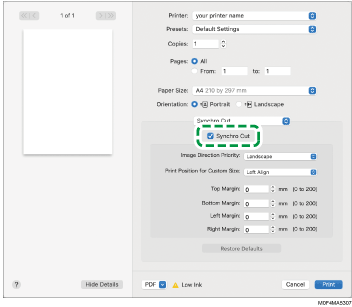
On the [Synchro Cut] menu, select [Synchro Cut].
After completing the configuration, click [Print] to print.