
Registering a User in the Address Book and Specifying the Login Information
When "Basic Authentication" is specified on the machine as the User Authentication, specify the login user name and password for each user who uses the machine.
 Press [Address Book] on the Home screen.
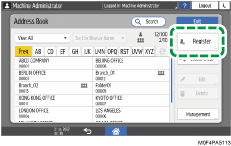
 On the Address Book screen, press [Register] and enter the user name.
 Press the [User Management / Others] tab
  [User Management].
 Enter the login information.
For Basic Authentication
Enter the Login User Name.
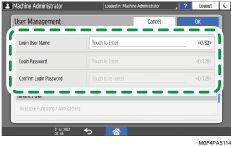
Enter the password in [Login Password], and then re-enter the password in [Confirm Login Password] for confirmation.
Press [OK].
 Press [OK].
 After completing the procedure, press [Home] (
 ).
).
 When a message prompting you to back up the address book appears on the screen, press [Go to Backup] to back up the address book.
If a message prompting you to contact the administrator to back up the address book appears on the screen, ask the administrator to back up the address book.
If you select [Close], you can close the address book without backing up and go back to the Home screen.