
Scan (Copier / Document Server Settings)
This section describes the settings in [Scan] under [Copier / Document Server Settings].
Original
Setting Items | Description |
|---|---|
Original Type Priority | You can specify the default setting of [Original Type] when the machine is turned on or [Reset] is pressed.
|
Original Photo Type Priority | You can specify the default setting of the photo type when [Original Type] is set to [Text/Photo] or [Photo] on the Copy screen.
|
Original Type Display (This setting item is available only when [Copier (Classic)] is used.) | You can specify whether to display or hide the Original Type keys on the Copy screen. The display shown below is an example when the setting is changed from [Display] to [Hide]. 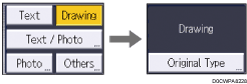
|
Color/Density (Copier/Document Server Settings)
Items | Description |
|---|---|
Auto Density Priority (B&W/Single Color) | You can specify whether to automatically adjust density for black-and-white copying when the machine is turned on or [Reset] is pressed.
|
Auto Density Priority (Full Color/Two-color) | You can specify whether to automatically adjust density for full-color copying when the machine is turned on or [Reset] is pressed.
|
Background Density of ADS (Full Color / Two-color) | You can adjust the background density in five levels to wash out the background texture when copying. Density is automatically adjusted for full-color copying.
|
Color Sensitivity | You can adjust the level to identify the color range of the specified color in five levels. When the color range of red has been set to [Wider], all the colors that are close to magenta and orange are identified as red. This setting is applied to identify red for copying in the color specified in [Erase Color].
Copying after Erasing a Specified Color Copying an Original While Replacing a Specified Color with Another |