
Combine
This section describes the settings in [Combine] under [Copier / Document Server Settings].
Setting Items | Description |
|---|---|
Copy Order in Combine | You can select the copy order in Combine mode. When [From Left to Right] is selected: 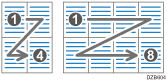 When [From Top to Bottom] is selected: 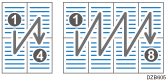
Combining and Copying a Multi-page Original onto a Single Sheet of Paper |
Separation Line in Combine | You can specify whether to use a separation line when copying multiple pages on one side of the paper. You can select the type as well as the color from seven colors. Type (Solid, Broken A, Broken B, Crop Marks): 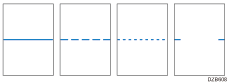 Selecting solid or broken lines might produce a blank area of approximately 1.5 mm (0.06 inches) in width along the separation line.
|