
Managing Folders as a File Administrator
Users with file administrator privileges can manage password-protected user folders.
The file administrator can delete unnecessary folders, change the password of a user who forgot it, and unlock a folder if it is locked by accidental operation.
 Log in to the machine as the file administrator.
For details about file administrator, see the following section:
 On the Home screen, press [Document Server].
 On the document server screen, press [Edit Folder].
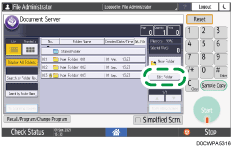
 Select the desired folder, and press the operation key.

 is displayed for password-protected folders.
Delete: Deletes the folder.
Change Folder Name: Enter a new folder name.
Change Password: Enter a new password.
Unlock: Unlocks the locked folder.
 is displayed for a locked folder. When the document is unlocked, changes to .
 After completing the operation, press [Exit].
 Press [Home] (
 ).
).
 Log out of the machine.

User folders can also be accessed from Web Image Monitor. Log in to the machine as the File Administrator and perform the required operations.