
Flipping the Original Horizontally When Copying
You can copy an original while flipping it horizontally (Mirror).
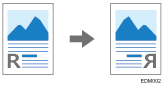
Stamps and page numbers are not inverted.
 Press [Copy] on the Home screen.

 Press [Mirror Image] on the Copy screen.

If you cannot find the key, select the item from [Edit].
 Place the original.
Basic Procedure for Copying Documents
The original is fed into the machine automatically, and copying starts. If the original is not fed automatically, press [Start].

You can specify this function when the original length is 15 m (590.5 inches) or smaller.