
Erasing Inside or Outside Specified Areas
When copying an original that includes soiled parts or patterns, you can specify the base point and the size of the unwanted area so that it is not reproduced on the output.
When erasing inside the specified area (Erase Inside)
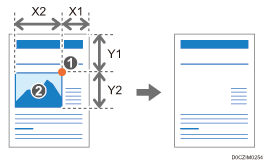
Base point
Area to be erased (X2, Y2)
You can specify up to five areas to erase.
When erasing outside the specified area (Erase Outside)
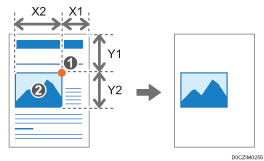
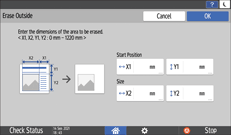
Base point
Area not to be erased (X2, Y2)
You can specify an area only.

When you use the paper that loaded into the paper bypass location, you cannot use this function.
You can specify this function when the original size is A0 (E) or smaller.
Copying Using [Erase Inside]
 Using a ruler, measure the base point (X1, Y1) and the size (X2, Y2) of the area to erase.
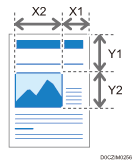
Measure the base point from the top right of the original.
Each value can be specified in a range from 0 to 1,220 mm (0.0 to 48.0 inches).
 Press [Copy] on the Home screen.

 Press [Erase Inside] on the Copy screen.
If the key is not found, select it from [Edit].
 Press [Erase Inside 1].
 Enter the values of the base point (X1, Y1) and the size (X2, Y2) of the area that you measured in Step 1, and then press [OK].
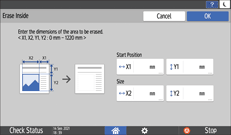
 If you specify two or more areas, press [Erase Inside 2] to [Erase Inside 5], and specify the areas.
 After completing specify the areas, press [OK] on the [Erase Inside] screen.
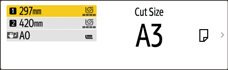
 Press the paper input select key and then select the paper size.
 Place the original.
Basic Procedure for Copying Documents
The original is fed into the machine automatically, and copying starts. If the original is not fed automatically, press [Start].
Copying Using [Erase Outside]
Using a ruler, measure the base point (X1, Y1) and the size (X2, Y2) of the area that is not to be erased.
Measure the base point from the top right of the original.
Each value can be specified in a range from 0 to 1,220 mm (0.0 to 48.0 inches).
Press [Copy] on the Home screen.
Press [Erase Outside] on the Copy screen.
If the key is not found, select it from [Edit].
Enter the values of the base point (X1, Y1) and the size (X2, Y2) of the area that you measured in Step 1, and then press [OK].
Press the paper input select key and then select the paper size.
Place the original.
Basic Procedure for Copying Documents
The original is fed into the machine automatically, and copying starts. If the original is not fed automatically, press [Start].