
Output Tray
This section describes the settings in [Output Tray] under [System Settings].
How to Use the Settings Screen
Setting Items | Description |
|---|---|
Output Tray: Copier | Specify a tray to which documents are delivered.
|
Output Tray: Document Server | Specify a tray to which documents are delivered.
|
Specify Tray for Lines | Select whether to specify a tray to eject the printed sheets of the received document per line type and sender (telephone line, Internet Fax, or IP-Fax).
|
Output Tray: Fax | Specify a tray to which documents are delivered.
|
Output Tray: Printer | Specify a tray to which documents are delivered.
|
Output Tray: Printer (Optional Network) | Specify the output tray to deliver the paper printed by print jobs that are executed via the expanded print server. You can use this function in the machines installed with RICOH Always Current Technology v1.2 or later.
|
Finisher Output Tray Setting | Use this setting to switch between [According to Function Setting] and [Auto Change]. This setting appears only when Booklet Finisher SR4140, Finisher SR4150, or Finisher SR4160 is attached to the machine.
|

The output tray depends on the installed options.
Supported Output Tray
You can specify the output tray for [Output Tray: Copier], [Output Tray: Document Server], [Output Tray: Fax], [Output Tray: Printer], or [Output Tray: Printer (Optional Network)]. The output tray name displayed on the control panel and the corresponding output tray are as described below:
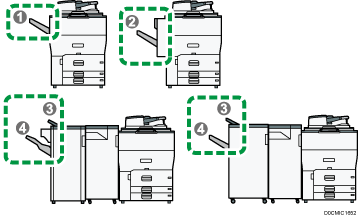
No. | Displayed Name | Output Tray |
|---|---|---|
1 | Copy Tray | Copy Tray |
2 | Shift Tray | Shift Tray |
3 | Finisher Upper Tray | Finisher Upper Tray |
4 | Finisher Shift Tray | Finisher Shift Tray |