Printing on Label Paper from the Bypass Tray
To print on label paper, load it in the bypass tray.
Load the label paper in the bypass tray.
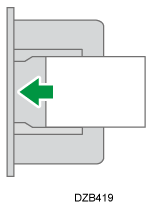
Label Paper
A4 or B4 paper
Printing surface: face down
Open a document to print on the computer, and display the setting screen of the printer driver from the print menu in the application.
Specify the Document Size, Paper Type, and the Input Tray.
Windows
On the [Basic] tab, configure the following settings:
Document Size: [A4 (210 x 297 mm)] or [B4 JIS (257 x 364 mm)]
Paper Type: [Labels]
Input Tray: [Bypass Tray]
macOS
Configure the following settings:
Paper Size: [A4] or [B4 (JIS)]
Printer Features
 Feature Sets: [Paper] Paper Type: [Labels]
Paper Feed
All Pages From: [Bypass Tray]
After completing the configuration, execute printing.