When Ghost Images of Printed Texts or Images Appear
If ghost printing of text or images appear, execute the auto adjustment of the image transfer voltage by the [Image Transfer Voltage Auto Adjustment] settings in [Maintenance]. If auto adjustment does not improve the problem, manually adjust the image transfer voltage by using [Adjust Image Transfer Voltage Offset].
Press [Settings] on the Home screen.

Press [Maintenance]
 [Image Transfer Voltage Auto Adjustment].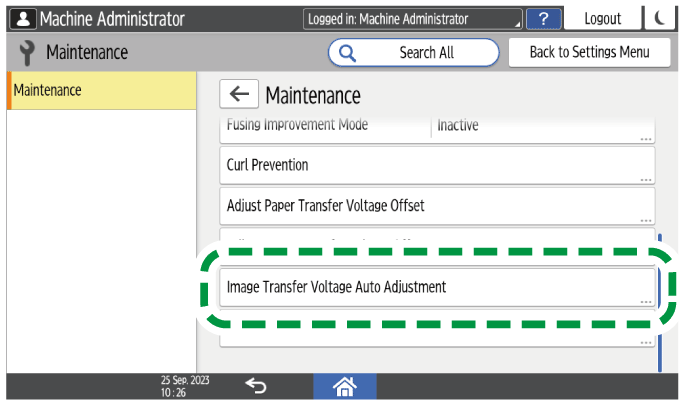
Press [OK]
[Exit].Press [Home] (
 ) after performing the adjustment.

If an error message appears, confirm that the cover is closed and try the procedure again.
Press [Settings] on the Home screen.
Press [Maintenance]
[Adjust Image Transfer Voltage Offset].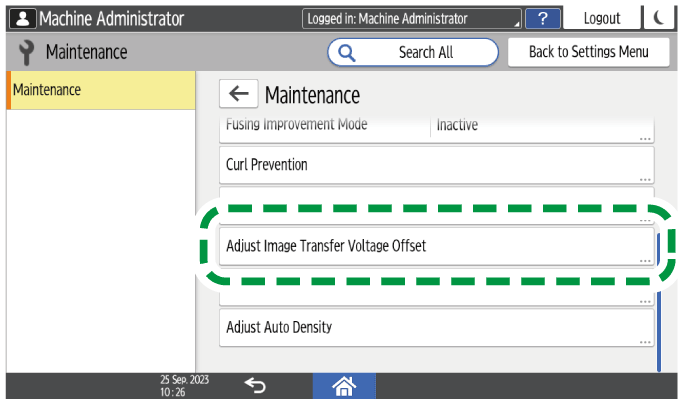
Press the value next to [Adjust Offset: Black] or [Adjust Offset: Color].
If a black ghost printed image appears, press the value next to [Adjust Offset: Black]. If a colored ghost printed image appears, press the value next to [Adjust Offset: Color].Enter the value you want to set for [Adjust Offset: Black] or [Adjust Offset: Color].
If a dark color ghost printed image appears, set a higher value. If a light color ghost printed image appears, set a lower value.
Press [OK].
Press [Home] (
) after performing the adjustment.