Registering Destinations to Reject
The function to register destinations to be blocked in the reception result screen has been added.
Up to version 1.1 |
Version 1.2 |
|---|---|
Unavailable |
Available |
From the senders list on the Reception Result screen, select the senders from which you do not want to receive faxes and register them one by one. Once registered, you will never receive faxes from a sender whose name matches the registered name.

It is necessary to set "Sender Specified in Authorized Reception per Sender" in [Fax Settings]
 [Reception Settings][Register Special Sender][Authorized Reception] to [Reject] in advance.
When the machine is configured to receive faxes only from special senders, the faxes from these senders will be rejected after completing the configuration described in this section. Be sure to delete these senders from [Reception Settings]
[Register Special Sender][Register/Change/Delete] before starting the configuration.
Press [Fax] on the Home screen.
Press [Job Status] on the fax screen.
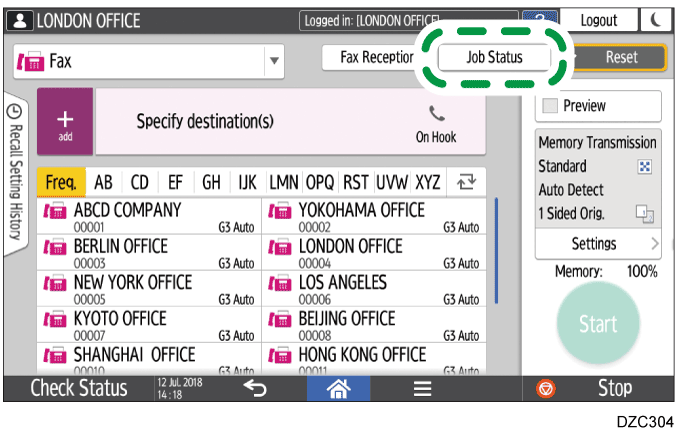
Press [Reception Result] and select [Display All] or [Display Specified Period].
Press [Authorized Reception Setting].
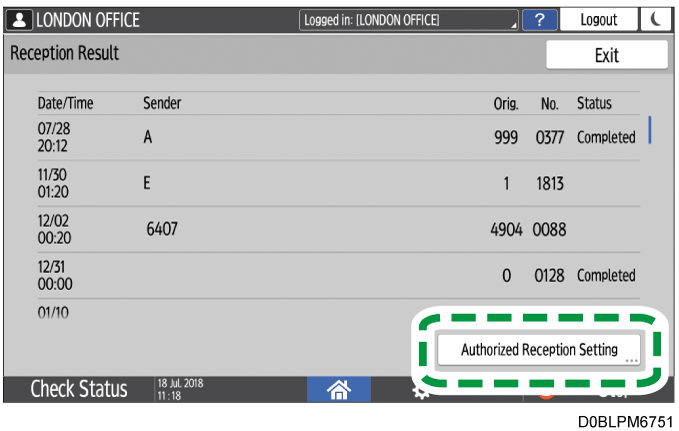
Check the "Sender" field, select the sender to reject, and then press [OK].

You can also specify the condition to match the specified string for the sender name. For details, see User Guide.