Encrypting Data to Prevent Data Leaks Caused by a Stolen or Disposed Machine
By encrypting data on the internal storage of the machine, you can prevent possible data leaks when you replace or dispose of the machine, or even if the machine were to be stolen.
Encrypting data on the internal storage
Encryption is an effective measure against data leaks. Be sure to keep the encryption key secure to use for decryption. Print it on a sheet or save it to a USB flash memory device.

Overwriting data to prevent restoration
You can delete data that you do not want to be restored. The Auto Erase Memory Setting function deletes the data temporarily stored on the machine for copying or printing, and the Erase All Memory function deletes all data and initializes the internal storage of the machine.
The Auto Erase Memory Setting function is available only when the machine is equipped with the HDD option.


|
You can encrypt data contained in the Address Book, authentication information, and stored documents to prevent data leaks in case the internal storage is removed from the machine.
Once encryption is enabled, all data subsequently stored on the machine will be encrypted.
The encryption algorithm used in the machine is AES-256.

The machine cannot be operated while encrypting data or canceling encryption.
Do not turn off the power of the machine while encrypting data or canceling encryption. If you turn off the power, the internal storage may be damaged and all data may be unusable.
After completing this procedure on the machine's control panel, turn off the main power and restart the machine to enable the new settings by turning it back on. Restarting can be slow when there is data to be carried over to the internal storage.
The process for encrypting the standard internal storage takes several minutes.
The encryption key is required for data recovery or migration to another machine. Be sure to keep the encryption key secure by printing it on a sheet or storing it in a USB flash memory device.
To transfer data from the machine to another machine, you must decrypt the encrypted data. Contact your service representative for data migration.
If you specify both the Erase All Memory function and the encryption function, the Erase All Memory function is performed first. Encryption starts after the Erase All Memory function has been completed and the machine has been rebooted.
Log in to the machine as the machine administrator on the control panel.
Logging in to the Machine as an Administrator
When custom-privileges administrators are registered, you can log in to the machine as a custom-privileges administrator with the File Management privilege as well.
Logging in to the Machine as a Custom-Privileges AdministratorOn the Home screen, press [Settings].

Press [System Settings].
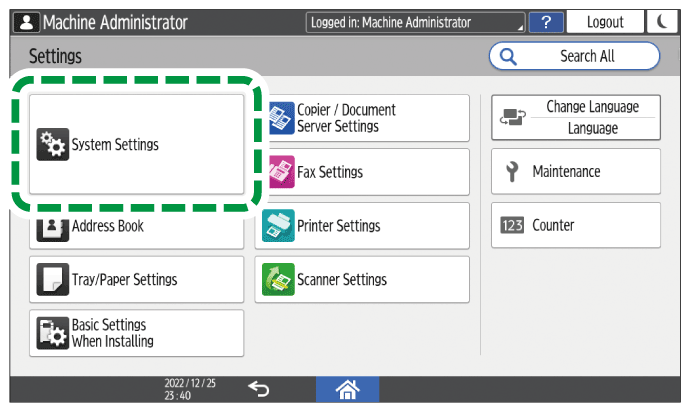
Press [Settings for Administrator]
 [File Management] [Machine Data Encryption Settings].
Press [Encrypt].

If the data has been encrypted, you can decrypt the data or back up the data.
Cancel Encryption: Cancels encryption.
Back Up Encryption Key: Makes a backup of the encryption key. The encryption setting is not changed.
Select the location to store the encryption key.
Save to Media: Saves the encryption key to a USB flash memory device. Insert a USB flash memory device into the media slot, and then press [Save to Media]
[OK].
Print on Paper: Prints the encryption key on a sheet of paper. Press [Print on Paper]
[Print].
Press [OK].
When the confirmation dialog is displayed, press [Exit].
Press [Home] (
 ), and then log out of the machine.
Turn off the main power of the machine, and then turn it back on.
When the main power is turned on, the machine starts to convert the data on the memory. Wait until the message "Memory conversion complete. Turn the main power switch off." appears. After that, turn off the main power again.
When the machine is equipped with the HDD option, you can overwrite and erase job data that was temporarily stored on the machine when using certain functions.
When the Auto Erase Memory Setting function is set to [On], temporary data that remained on the hard disk while the Auto Erase Memory Setting function was set to [Off] might not be overwritten.
If the main power switch is turned off before the Auto Erase Memory Setting process is completed, overwriting will stop and data will be left on the hard disk. Do not stop the overwrite mid-process. Doing so will damage the hard disk.
If the main power switch is turned off before the Auto Erase Memory Setting process is completed, overwriting will continue once the main power switch is turned back on.
If an error occurs before the overwriting process is completed, turn off the main power. Turn it back on, and then repeat from Step 1.
The machine will not enter Sleep mode until the overwriting process is completed.
Log in to the machine as the machine administrator on the control panel.
Logging in to the Machine as an Administrator
When custom-privileges administrators are registered, you can log in to the machine as a custom-privileges administrator with the Data Management privilege as well.
Logging in to the Machine as a Custom-Privileges AdministratorOn the Home screen, press [Settings].
Press [System Settings].
Press [Settings for Administrator]
 [Data Management] [Auto Erase Memory Setting].
From the list next to Auto Erase Memory Setting, select [On], and then select an erase method.
The default erase method is [Random Numbers], and the default number of overwrites is [3].
NSA*1: Overwrites data twice with random numbers and once with zeros.
DoD*2: Overwrites data with a random number, then with its complement, then with another random number, and the data is verified.
Random Numbers: Overwrites data multiple times with random numbers. Select the number of overwrites from one to nine.
*2 Department of Defense (U.S.A)Press [OK].
Press [Home] (
), and then log out of the machine.

If you enable the Auto Erase Memory Setting function along with the data encryption function, the overwriting data will also be encrypted.
To check the overwriting process on the control panel
When the Auto Erase Memory Setting function is enabled, the data overwrite icon is displayed at the bottom right of the control panel screen to indicate the status of data that is not overwritten.
The machine will not enter Sleep mode while overwriting is in progress. When overwriting has been completed, the machine enters Sleep mode.
Do not turn off the main power of the machine while overwriting is in progress. Be sure to check the data status with the data overwrite icon on the screen.
Even though there is Hold Print/Stored Print/Locked Print/Sample Print data in the hard disk, the "No data remains" icon is displayed as the data overwrite icon.
There is data to be overwritten.

This icon lights up when there is data to be overwritten, and flashes during overwriting.
Overwriting starts automatically once the job is completed.
The Copier, Fax, and Printer functions take priority over the Auto Erase Memory Setting function. Overwriting will start after the job is completed.
No data remains.

The trash box of the icon is empty when there is no data to be overwritten.
This icon is also displayed when there is Hold Print/Stored Print/Locked Print/Sample Print data in the hard disk.
As data scanned enabling the read-ahead function of the TWAIN driver is stored on the HDD, it can be overwritten. Data scanned without enabling the read-ahead function is not overwritten.
If the data overwrite icon indicates that there is data to be overwritten while there is no data to be overwritten, turn off the main power of the machine. Turn it on again and see if the icon changes to indicate that there is no data to be overwritten. If it does not change, contact your service representative.
If the data overwrite icon is not displayed, first check if the Auto Erase Memory Setting function is set to [Off]. If the icon is not displayed even though the Auto Erase Memory Setting function is set to [On], contact your service representative.

Overwrite and erase all data stored on the internal storage when you relocate or dispose of the machine. The device settings stored on the machine's memory are initialized.
For details about using the machine after executing Erase All Memory, contact your service representative.
If the main power switch is turned off before the Erase All Memory process is completed, overwriting will be stopped and data will be left on the internal storage. Do not stop the overwrite mid-process. Doing so will damage the internal storage.
Before you start the Erase All Memory process, we recommend that you back up the user codes, the counters for each user code, and the Address Book. You can back up the user codes and the counters for each user code using Device Manager NX. For details, see Device Manager NX Help. You can back up the Address Book using the control panel.
If the method of Random Numbers is selected and overwrite three times is set on the machine with the standard internal storage, the Erase All Memory process takes up to 2 hours and 15 minutes. You cannot operate the machine during overwriting.
The Erase All Memory function also clears the machine's security settings, so that neither machine nor user administration will be possible. Ensure that users do not save any data on the machine after the Erase All Memory process is completed.
Log in to the machine as the machine administrator on the control panel.
Logging in to the Machine as an Administrator
When custom-privileges administrators are registered, you can log in to the machine as a custom-privileges administrator with the Data Management privilege as well.
Logging in to the Machine as a Custom-Privileges AdministratorOn the Home screen, press [Settings].
Press [System Settings].
Press [Settings for Administrator]
[Data Management] [Erase All Memory].From the list next to Erase Method, select an erase method.
The default erase method is [Random Numbers], and the default number of overwrites is [3].
NSA*1: Overwrites data twice with random numbers and once with zeros.
DoD (5220.22-M)*2: Overwrites data with a random number, then with its complement, then with another random number, and the data is verified.
Random Numbers: Overwrites data multiple times with random numbers. Select the number of overwrites from one to nine.
Format: Formats the internal storage. Data is not overwritten.
BSI/VSITR: Overwrites data seven times with the fixed value (for example: 0x00).
Secure Erase (ATA): Overwrites data using an algorithm that is built in to the internal storage.
*2 Department of Defense (U.S.A)Press [Erase].
Press [Yes].
When the Erase All Memory process is completed, press [Exit], and then turn off the main power of the machine.
If the main power of the machine is turned off before the Erase All Memory process is completed, overwriting will start over when the main power is turned back on.
If an error occurs before overwriting is completed, turn off the main power of the machine. Turn it back on, and then repeat from Step 1.
To print the erase result, press [System Settings]
[Settings for Administrator] [Data Management] [Erase All Memory], and then press [Print Report].Initialize the settings on the control panel as necessary. Press [System Settings]
[Settings for Administrator] [Data Management] [Restore Default Control Panel Settings] to initialize the data, including the individual application settings and cache memory.