
Copying Two-sided Original
You can copy front and back sides of two-sided original onto one side of a sheet (Series).

 Press [Copy] on the Home screen.

 Press [Series] on the Copy screen.

If the key is not displayed, select it from [Series] at the bottom of the Copy screen.
 Specify Series.
Select two-sided original under "Original".
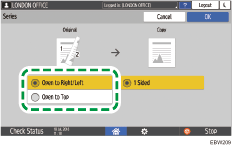
 Press [OK].
 Place the original.
 Press [Start].
When placing the originals on the exposure glass, press [Finish Scn] after scanning all of the originals if necessary according to the number of originals.