
Copying in Page Order or for Each Page Number
When copying two or more copies of multi-page originals, you can specify the page order as described below.
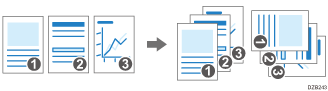
Sort
Copies in the order of the original.

Rotate Sort
Copies in the order of the original and outputs by rotating each copy set. Each copy set is output lengthwise and breadthwise alternately to identify each set.
To specify rotate sort, use two paper trays and set the same size and type of paper in the trays in different orientations, vertically ( ) and horizontally (
 ). When the paper cannot be set in vertical () orientation, you cannot specify Rotate Sort.
 Press [Copy] on the Home screen.

 Place the original.
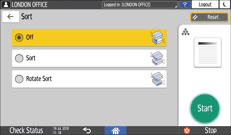
 Press [Sort] on the Copy screen.

If the key is not displayed, select it from [Finishing].
 Select the function to specify.
 Press [Start].
When selecting [Sort] or [Rotate Sort] and placing an original on the exposure glass, a single set of copies is made. After scanning all of the originals, press [Finish Scn] to copy the rest of the sets.

You can change the action to perform when paper or memory runs out during sorting under [Rotate Sort: Auto Paper Continue].