
09: Endbearbeitung: Falz
0901: Z-Falz-Position 1
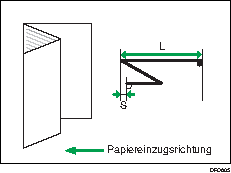
Passen Sie die Breite des unteren Segments (S) von Blättern mit Z-Falz bei Verwendung der Papierfalzeinheit an.
Drücken Sie [ ] zum Erhöhen und [
 ] zum Verringern (S).
Das Zeichen  zeigt die Vorderkante (in Richtung des Papiereinzugs) und das Zeichen
  die Hinterkante an.
Einstellelemente | Standardwert | Max. Wert | Min. Wert | Schritt | Einheit |
|---|---|---|---|---|---|
A3 B4 JIS A4 11 × 17 81/2 × 14 81/2 × 11 12 × 18 8K And. Papierform. | 0,0 | 4,0 | -4,0 | 0,2 | mm |

0902: Z-Falz-Position 2
Passen Sie die gesamte Falzgröße (L) von Blättern mit Z-Falz bei Verwendung der Papierfalzeinheit an.
Drücken Sie [] zum Erhöhen und [] zum Verringern (L).
Das Zeichen zeigt die Vorderkante (in Richtung des Papiereinzugs) und das Zeichen die Hinterkante an.
Einstellelemente | Standardwert | Max. Wert | Min. Wert | Schritt | Einheit |
|---|---|---|---|---|---|
A3 B4 JIS A4 11 × 17 81/2 × 14 81/2 × 11 12 × 18 8K And. Papierform. | 0,0 | 4,0 | -4,0 | 0,2 | mm |
0903: Einbruchfalz-Position: 1-Blatt-Falz
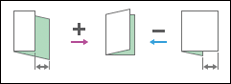
Falzposition anpassen, wenn Einbruch-Falz von der Papierfalzeinheit ausgeführt wird. Wird angewendet, wenn Ein-Blatt-Falz gewählt ist.
Einstellelemente | Standardwert | Max. Wert | Min. Wert | Schritt | Einheit |
|---|---|---|---|---|---|
A3 B4 JIS A4 B5 JIS 13 × 19 12 × 18 11 × 17 81/2 × 14 81/2 × 11 8K 13 × 191/5 13 × 18 123/5 × 181/2 123/5 × 191/5 SRA3 SRA4 226 × 310 mm 310 × 432 mm And. Papierform. | 0,0 | 4,0 | -4,0 | 0,2 | mm |
0904: Einbruchfalz-Position: Multi-Blatt-Falz
Falzposition anpassen, wenn Einbruch-Falz von der Papierfalzeinheit ausgeführt wird. Wird angewendet, wenn Multi-Blatt-Falz gewählt ist.
Einstellelemente | Standardwert | Max. Wert | Min. Wert | Schritt | Einheit |
|---|---|---|---|---|---|
A3 B4 JIS A4 B5 JIS 13 × 19 12 × 18 11 × 17 81/2 × 14 81/2 × 11 8K 13 × 191/5 13 × 18 123/5 × 181/2 123/5 × 191/5 SRA3 SRA4 226 × 310 mm 310 × 432 mm And. Papierform. | 0,0 | 4,0 | -4,0 | 0,2 | mm |
0905: Zickzackfalz-Posit. 1: 1-Blatt-Falz
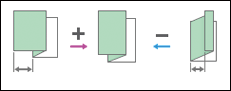
Falzposition an der Vorderkante der Seite anpassen, wenn Zickzackfalz von der Papierfalzeinheit ausgeführt wird. Wird angewend., wenn Ein-Blatt-Falz gewählt ist.
Einstellelemente | Standardwert | Max. Wert | Min. Wert | Schritt | Einheit |
|---|---|---|---|---|---|
A3 | 0,0 | 4,0 | -4,0 | 0,2 | mm |
B4 JIS | |||||
A4 | |||||
B5 JIS | 3,0 | -3,0 | |||
12 × 18 | 4,0 | -4,0 | |||
11 × 17 | |||||
81/2 × 14 | |||||
81/2 × 11 | |||||
8K | |||||
And. Papierform. |
0906: Zickzackfalz-Position 1: Multi-Blatt-Falz
Falzposition an der Vorderkante der Seite anpassen, wenn Zickzackfalz von der Papierfalzeinheit ausgeführt wird. Wird angewend., wenn Multi-Blatt-Falz gewählt ist.
Einstellelemente | Standardwert | Max. Wert | Min. Wert | Schritt | Einheit |
|---|---|---|---|---|---|
B4 JIS | 0,0 | 4,0 | -4,0 | 0,2 | mm |
A4 | |||||
B5 JIS | 3,0 | -3,0 | |||
81/2 × 14 | 4,0 | -4,0 | |||
81/2 × 11 | |||||
And. Papierform. |
0907: Zickzackfalz-Posit. 2: 1-Blatt-Falz
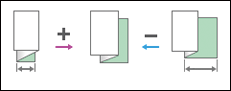
Falzposition an der Hinterkante der Seite anpassen, wenn Zickzackfalz von der Papierfalzeinheit ausgeführt wird. Wird angewend., wenn Ein-Blatt-Falz gewählt ist.
Einstellelemente | Standardwert | Max. Wert | Min. Wert | Schritt | Einheit |
|---|---|---|---|---|---|
A3 | 0,0 | 4,0 | -4,0 | 0,2 | mm |
B4 JIS | |||||
A4 | |||||
B5 JIS | 3,0 | -3,0 | |||
12 × 18 | 4,0 | -4,0 | |||
11 × 17 | |||||
81/2 × 14 | |||||
81/2 × 11 | |||||
8K | |||||
And. Papierform. |
0908: Zickzackfalz-Position 2: Multi-Blatt-Falz
Falzposition an der Hinterkante der Seite anpassen, wenn Zickzackfalz von der Papierfalzeinheit ausgeführt wird. Wird angewend., wenn Multi-Blatt-Falz gewählt ist.
Einstellelemente | Standardwert | Max. Wert | Min. Wert | Schritt | Einheit |
|---|---|---|---|---|---|
B4 JIS | 0,0 | 4,0 | -4,0 | 0,2 | mm |
A4 | |||||
B5 JIS | 3,0 | -3,0 | |||
81/2 × 14 | 4,0 | -4,0 | |||
81/2 × 11 | |||||
And. Papierform. |
0909: Wickelfalz-Position 1: 1-Blatt-Falz
Falzposition an der Vorderkante der Seite anpassen, wenn Wickelfalz von der Papierfalzeinheit ausgeführt wird. Wird angewendet, wenn Ein-Blatt-Falz gewählt ist.
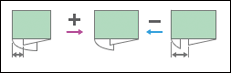
Einstellelemente | Standardwert | Max. Wert | Min. Wert | Schritt | Einheit |
|---|---|---|---|---|---|
A3 B4 JIS A4 B5 JIS 12 × 18 11 × 17 81/2 × 14 81/2 × 11 8K And. Papierform. | 0,0 | 4,0 | -4,0 | 0,2 | mm |
0910: Wickelfalz-Position 1: Multi-Blatt-Falz
Falzposition an der Vorderkante der Seite anpassen, wenn Wickelfalz von der Papierfalzeinheit ausgeführt wird. Wird angewend., wenn Multi-Blatt-Falz gewählt ist.
Einstellelemente | Standardwert | Max. Wert | Min. Wert | Schritt | Einheit |
|---|---|---|---|---|---|
A3 B4 JIS A4 B5 JIS 12 × 18 11 × 17 81/2 × 14 81/2 × 11 8K And. Papierform. | 0,0 | 4,0 | -4,0 | 0,2 | mm |
0911: Wickelfalz-Position 2: 1-Blatt-Falz
Falzposition an der Hinterkante der Seite anpassen, wenn Wickelfalz von der Papierfalzeinheit ausgeführt wird. Wird angewendet, wenn Ein-Blatt-Falz gewählt ist.
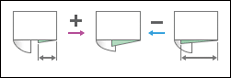
Einstellelemente | Standardwert | Max. Wert | Min. Wert | Schritt | Einheit |
|---|---|---|---|---|---|
A3 B4 JIS A4 B5 JIS 12 × 18 11 × 17 81/2 × 14 81/2 × 11 8K And. Papierform. | 0,0 | 4,0 | -4,0 | 0,2 | mm |
0912: Wickelfalz-Position 2: Multi-Blatt-Falz
Falzposition an der Hinterkante der Seite anpassen, wenn Wickelfalz von der Papierfalzeinheit ausgeführt wird. Wird angewendet, wenn Multi-Blatt-Falz gewählt ist.
Einstellelemente | Standardwert | Max. Wert | Min. Wert | Schritt | Einheit |
|---|---|---|---|---|---|
A3 | 0,0 | 4,0 | -4,0 | 0,2 | mm |
B4 JIS | |||||
A4 | |||||
B5 JIS | |||||
12 × 18 | |||||
11 × 17 | |||||
81/2 × 14 | |||||
81/2 × 11 | 0,0*1 | ||||
8K | -4,0 | ||||
And. Papierform. |
*1 Wenn das verwendete Gerät die Auswahl von -0,1 mm oder weniger zulässt, wird dies als 0,0 mm interpretiert.
0913: Doppelparallelfalz-Position 1
Falzposition anpassen, wenn Parallelfalz von der Papierfalzeinheit ausgeführt wird.
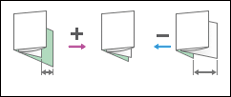
Einstellelemente | Standardwert | Max. Wert | Min. Wert | Schritt | Einheit |
|---|---|---|---|---|---|
A3 B4 JIS A4 B5 JIS 12 × 18 11 × 17 81/2 × 14 81/2 × 11 8K And. Papierform. | 0,0 | 4,0 | -4,0 | 0,2 | mm |
0914: Doppelparallelfalz-Position 2
Zweite Falzposition anpassen, wenn Parallelfalz von der Papierfalzeinheit ausgeführt wird.
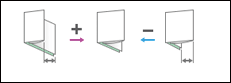
Einstellelemente | Standardwert | Max. Wert | Min. Wert | Schritt | Einheit |
|---|---|---|---|---|---|
A3 B4 JIS A4 B5 JIS 12 × 18 11 × 17 81/2 × 14 81/2 × 11 8K And. Papierform. | 0,0 | 4,0 | -4,0 | 0,2 | mm |
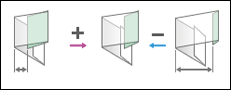
0915: Fensterfalz-Position 1
Falzposition an der Vorderkante der Seite anpassen, wenn Fensterfalz von der Papierfalzeinheit ausgeführt wird.
Einstellelemente | Standardwert | Max. Wert | Min. Wert | Schritt | Einheit |
|---|---|---|---|---|---|
A3 B4 JIS A4 B5 JIS 11 × 17 81/2 × 14 81/2 × 11 8K And. Papierform. | 0,0 | 4,0 | -4,0 | 0,2 | mm |
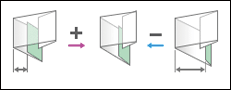
0916: Fensterfalz-Position 2
Falzposition an der Hinterkante der Seite anpassen, wenn Fensterfalz von der Papierfalzeinheit ausgeführt wird.
Einstellelemente | Standardwert | Max. Wert | Min. Wert | Schritt | Einheit |
|---|---|---|---|---|---|
A3 B4 JIS A4 B5 JIS 11 × 17 81/2 × 14 81/2 × 11 8K And. Papierform. | 0,0 | 4,0 | -4,0 | 0,2 | mm |
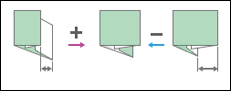
0917: Fensterfalz-Position 3
Falzposition in der Mitte anpassen, wenn Fensterfalz von der Papierfalzeinheit ausgeführt wird.
Einstellelemente | Standardwert | Max. Wert | Min. Wert | Schritt | Einheit |
|---|---|---|---|---|---|
A3 B4 JIS A4 B5 JIS 12 × 18 11 × 17 81/2 × 14 81/2 × 11 8K And. Papierform. | 0,0 | 4,0 | -4,0 | 0,2 | mm |