
List of Specifications
Specifications for the Main Unit
Item | Specifications |
|---|---|
Nozzles |
|
Configuration | Console |
Memory | 6 GB (4 GB on the main unit and 2 GB on the control panel) |
Hard disk size | 320 GB |
Color | Full Color |
Warm-up time | Normal mode: 40 seconds Quick mode: 30 seconds |
First print time |
|
Printing size | |
Paper weight | |
Missing image area | 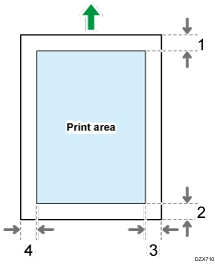
|
Paper output capacity | 1 sheet or more |
Paper capacity (80 g/m2, 20 lb. Bond) | |
Combine | Standard |
Power requirements |
220-240 V, 1.9 A, 50/60 Hz
120-127 V, 3.6 A, 60 Hz |
Power consumption (Main unit only) | Ready: 33.8 W During printing: 77.9 W Maximum: 88.4 W The power level when the main switch is turned off and the power cord is plugged into an outlet: 1 W or less |
Power consumption (Complete system) | Maximum: 110 W The complete system of the IP CW2200 consists of the main unit, paper input location 2, wireless LAN board, and card reader. |
Power consumption (Main unit only) | Ready: 32.8 W During printing: 75.3 W Maximum: 84.1 W The power level when the main switch is turned off and the power cord is plugged into an outlet: 1 W or less |
Power consumption (Complete system) | Maximum: 107 W The complete system of the IP CW2200 consists of the main unit, paper input location 2, wireless LAN board, and card reader. |
Dimensions (W × D × H) | 1384 × 885 × 1170 mm (54.5 × 34.9 × 46.1 inches) (Output basket in basic mode, control panel is perpendicular to the machine.) |
Space for main unit (W × D) | 1384 × 885 mm (54.5 × 34.9 inches) or less |
Noise emission (Sound power level: Complete system) | Stand-by: 40 dB Printing: B&W: 68 dB / Color: 66 dB |
Noise emission (Sound pressure level: Complete system) | Stand-by: 36 dB Printing: B&W: 60 dB / Color: 60 dB |
Noise emission (Sound pressure level) |
|
Weight | Approx. 100 kg (220.5 lb.) |
 )
) (mainly Europe and Asia)
 (mainly North America)
Specifications for Printer

To connect the machine to the network, use a LAN cable supporting 1000BASE-T, 100BASE-TX, and 10BASE-T. The length of the usable cable is up to 100 m.
Item | Specifications |
|---|---|
Printing speed | Speed Priority (Drawing) mode
|
Resolution | 600 × 300 dpi, 600 × 600 dpi, 1,200 × 1,200 dpi |
Printer language | RPGL/GL2, PostScript3, PDF, RTIFF, MediaPrint (JPEG, TIFF) |
Interface |
|
Network protocol | TCP/IP (IPv4, IPv6) |
USB interface |
|
Operating system |
|
Fonts |
|
Store function | Total number of documents that can be stored: Up to 100 documents Number of pages for each document that can be stored: Up to 1,000 pages Total number of pages of all documents that can be stored: Up to 3,000 pages |
Sort function | Number of pages that can be sorted: Up to 1,000 pages Number of prints that can be sorted: Up to 999 prints |
 , 22 × 34
The maximum length for the cable connecting the machine to an Ethernet network is 100 meters.
Specifications for Paper Input Location 2
Item | Specifications |
|---|---|
Page size | |
Paper capacity (80 g/m2, 20 lb. Bond) | |
Paper weight | |
Power requirements | Power is supplied from the main unit. |
Dimensions (W × D × H) | 1102 × 348 × 213 mm (43.4 × 13.8 × 8.4 inches) |
Weight | Approx. 11 kg (24.3 lb.) |
You cannot use the following paper:
Paper width: more than 841 mm (34 inches)
Paper weight: 120 g/m2 or more
Paper thickness: 0.150 mm (0.006 inches) or more
Specifications for Wireless LAN Board

Note that the available channels (frequency ranges) and locations to use the wireless LAN are subject to the regulations of the country or region where the printer is used. Be sure to use the wireless LAN according to the applicable regulations.
Item | Specifications |
|---|---|
Transmission spec | Based on IEEE 802.11a/b/g/n (wireless LAN) |
Transmission rate |
|
Frequency range (Center Frequency) |
|
Transmission mode |
|
Web Image Monitor is supported.
The transmission rates of 130 Mbps in the 2.4 GHz band is the theoretical values of the wireless LAN specification. The actual transmission rate may be lower, depending on the operating environment.
Channels other than 1–11 cannot be used because of the specifications and the configuration of the access point.
The channel in use might differ depending on the country.
Specifications for Device Server Option
Item | Specifications |
|---|---|
Interface |
|
Operating systems |
|
Protocol |
|