
Setting the Sound Volume and Type
Setting the Sound Volume and Type for Operations and Messages
You can set the sound generated when you operate the machine or an error occurs.
 Press [Settings] on the Home screen.
 Press [System Settings].
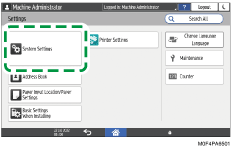
 Press [Sound]
 [Volume].
 Adjust the sound volume using the slide bar.
Move the slider on the bar to the right to increase the volume.
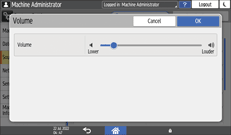
 Press [OK].
 To change the sound type, press the item to change.
You can set the items below.
Item | Description | Sound Type |
|---|---|---|
Touch/Notification Sound | Sound when you press the screen | No Sound/Sound of Beep/Sound of Tap 1-4 |
Invalid Operation Sound | Sound for inactive operation | No Sound/Sound of Beep/Sound of Invalid 1-2 |
Operation Completed Sound | Sound when the procedure ends | No Sound/Sound of Beep/Sound of Completed 1-3 |
Login Sound | Sound for logging in | No Sound/Sound of Beep/Sound of Login 1-2 |
Logout Sound | Sound for logging out | No Sound/Sound of Beep/Sound of Logout 1-2 |
Warm-up Sound | Sound when warming-up of the machine is completed | No Sound/Sound of Beep/Sound of Warm-up 1-2 |
Caution Sound | Sound when an error occurs | No Sound/Sound of Beep/Sound of Alert 1-3 |
Warning Sound | Sound when an error occurs and a process is interrupted | No Sound/Sound of Beep/Sound of Error 1-3 |
 Select the sound type.
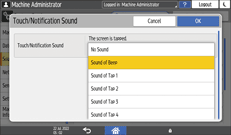
 Press [OK].
 After completing the procedure, press [Home] (
 ).
).