
Configuring the Settings to Send E-mails from the Machine
You can send e-mails from the machine. Configure the settings required for connecting to and authenticating the server before sending an e-mail to a specified e-mail address.
Configuring the Initial Settings to Send E-mails
 On the Home screen, press [Settings].
 Press [System Settings].
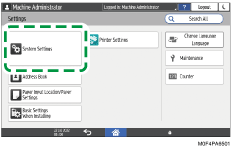
 Press [Send (Email/Folder)]
 [Email][SMTP Server].
 Configure the information of the server.
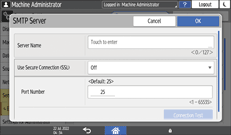
Server Name: Enter the FQDN (Fully Qualified Domain Name without omitting the domain name, subdomain name, or host name used in the TCP/IP network) of the SMTP server, or enter the IPv4 address. When you enter the FQDN, configure [DNS Configuration] on [System Settings]
[Network/Interface].Use Secure Connection (SSL): Specify whether to use SSL.
Port Number: Enter the port number to use for the connection to the SMTP server.
 Press [Connection Test], confirm that the machine is connected to the server, and then press [OK].
If the machine fails to connect to the server, check with the network administrator or internet service provider (ISP) that the entered information is correct.
 According to the settings on the SMTP server to connect, configure [SMTP Authentication] or [POP before SMTP].
 After completing the configuration, press [Home] (
 ).
).