
Confirming the Counter for Each User
When User Code authentication is activated on the machine, you can confirm the usage status of the Printer function for individual users.
Confirming/Clearing/Printing the Counter for Each User
 Log in to the machine as an administrator on the control panel.
 On the Home screen, press [Settings].
 On the Settings screen, press [Counter].
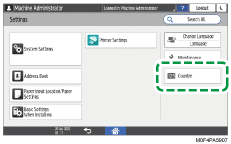
 Press [Display/Clear/Print Counter per User], and then select a counter.
 Confirm, clear, or print the counter.
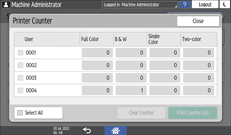
To clear the counter
Select a user.
To clear the counters of all users, select [Select All].
Press [Clear Counter].
Confirm or select the counter type, and then press [OK].
To print the counter
Select a user.
To print the counters of all users, select [Select All].
Press [Print Counter List].
Confirm or select the counter type, and then press [OK].
 Press [Close] three times.
 Press [Home] (
 ), and then log out of the machine.