
Specifying Menu Protect
Menu Protect allows you to prohibit users, except for the machine administrator, from changing the settings of the Printer function.

Enable Administrator Authentication for the machine administrator in advance.
 Log in to the machine as the machine administrator on the control panel.
 On the Home screen, press [Settings].
 On the Settings screen, press [System Settings]
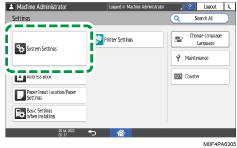
 Press [Settings for Administrator]
 [Function Restriction][Menu Protect].
 Select the security level from the list next to Printer.
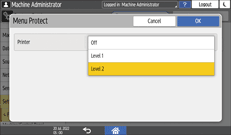
Level 1/Level 2: Enables Menu Protect. Select [Level 2] to impose stricter restrictions. Required authority for each operation item varies according to the level.
For a list of settings that users can specify according to the menu protect level, see "Security Reference" on our website.
Off: Disables Menu Protect.
 Press [OK].
 Press [Home] (
 ), and then log out of the machine.