
Printing the Configuration Page
You can print the configuration information of the machine using the control panel.
The paper size for printing the configuration information of the machine is fixed to A4 (or 81/2 × 11). It is recommended that plain/recycled paper of the A4 (or 81/2 × 11) size should be loaded in one of the paper input locations.
A paper input location loaded with A4 (or 81/2 × 11) size paper is automatically selected. When no paper input location is loaded with such paper, the priority input location is selected. If the priority input location is loaded with paper other than A4 (or 81/2 × 11) size paper, part of the print data may not be printed or the data may be printed with large margins.
 Log in to the machine as the machine administrator on the control panel.
 On the Home screen, press [Settings].
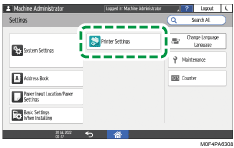
 On the Settings screen, press [Printer Settings].
 Press [List/Test Print]
 [Machine Information][Configuration Page].
 Press [Start].
 After completing the print, press [Home] (
 ), and then log out of the machine.
Items Printed on the Configuration Page
On the configuration page, the machine's device information, paper input location and paper settings, [Printer Settings], network configuration information will be printed.
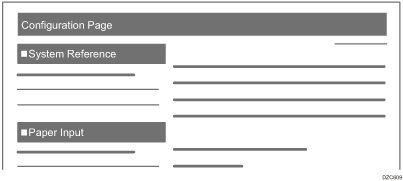
System Reference
The firmware version, counter information, memory capacity, and name of the installed options are printed.
Paper Input
The paper input location to be used first, the type and size of the paper loaded in the paper input location, and other information are printed.
When "Custom Size" is printed, a user-defined paper size is specified.

Other than the functions mentioned above, the settings of the [Printer Settings] and network configuration information are printed.