
Managing Locked Files as the File Administrator
If a user has forgotten the password to access a stored document, the file administrator can change the password. The file administrator also can delete unneeded documents and unlock documents locked by entering an invalid password.
 Log in to the machine as the file administrator.
 On the Home screen, press [Quick Print Release].

 On the Quick Print Release screen, select the document and perform operations as follows:
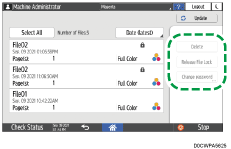
Delete: Delete the locked document.
Release File Lock: Unlock the locked document ( ).
).
 After completing the configuration, log out of the machine.