
Replacing an Ink Collector Unit
The ink collector unit needs to be replaced soon when the "Ink Collector Unit almost full." message is displayed. Prepare a replacement ink collector unit.
See the animation displayed on the control panel of the machine for the procedure to replace the ink collector unit.

When removing the ink collector unit, do not touch the inside of the machine.
Do not touch the ink collector unit's chip contacts.
Do not drop or tilt the ink collector unit. Doing so may result in leakage.
Take care not to drop the ink collector unit when putting it in the supplied plastic bag. The bag might tear, causing ink to spill.
Push in the ink collector unit until the lever clicks. If it does not click into place, ink may leak inside the machine.
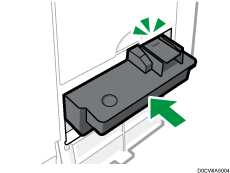
Do not open the ink collector unit cover other than when replacing the ink collector unit. Doing so may result in misfeeds.
 Replace the ink collector unit by following the procedure shown in the animation.
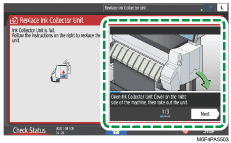
If you have turned off the screen, press [Check Status] and then press [Check] under [Machine Status] tab.
Precautions When Replacing the Ink Collector Unit

- The following explains the warning messages on the plastic bag used in this product's packaging:
Do not leave the polythene materials (bags, etc.) supplied with this machine close to babies and small children. Suffocation can result if polythene materials are brought into contact with the mouth or nose.

- Keep the print cartridge and ink collector unit out of reach of children.
- When replacing ink collector unit, avoid getting ink on your clothing. If ink comes into contact with your clothing, wash the stained area with cold water. Hot water will set the ink into the fabric and make removing the stain impossible.
- If ink (including used ink) comes into contact with eyes, wash eyes immediately with running water. When finding unusual reactions, consult a doctor.
- When ingesting ink (including used ink), induce vomiting by drinking a strong saline solution and consult a doctor immediately.
- When removing jammed paper or replacing or replenishing ink, be careful not to soil your hands. If ink comes into contact with your skin, wash the affected area thoroughly with soap and water.
Disposing Exhausted Ink Collector Unit
Ink collector unit cannot be re-used.
 (mainly Europe and Asia)
If you want to discard your used ink collector unit, please contact your local sales office. If you discard it by yourself, treat it as general plastic waste material.
 (mainly North America)
Please see our local company website for information on the recycling of supply products, or you can recycle items according to the requirements of your local municipalities or private recyclers.