
Precautions for Moving the Machine

- When carrying or moving the machine by lifting it for relocation to another floor, contact your service representative. Dropping or toppling the machine can result in injury or malfunction.

Safety regulations (RF emission and material regulations) differ in each country. You may be subject to prosecution if you violate local laws and regulations by moving this machine and consumables to another country.
When moving the machine over a long distance or to another building, consult your sales representative. When moving it to another floor in the same building, consult your service representative. Note that a charge will be incurred for this task.
Optimum Environmental Conditions After Moving the Machine

- Be sure to install the machine as close as possible to a wall outlet so that you can disconnect the power cord plug easily in an emergency.
- If the machine topples or a cover or other part is damaged, turn off the power immediately. After disconnecting the power cord plug from the wall outlet, contact your service representative. Using the machine continuously can result in fire or electric shock.
- Do not place the machine in a humid or dusty environment. Doing so can result in fire or electric shock.
- Do not place the machine on an unstable or tilted surface. Doing so can cause the machine to fall or topple over, possibly resulting in injury.
- After moving the machine, use the caster fixture to fix it in place. Otherwise, the machine might move or topple over to cause injury.
- When using this machine in a poorly ventilated or narrow room continuously for a long period of time or printing a high volume of materials, make sure to ventilate the room sufficiently.
- When moving the machine, do not hold the control panel. Doing so may damage the control panel and can result in injury or malfunction.
- When moving the machine, make sure to unplug the power cord from the wall outlet and confirm that line cords and other connecting cables have been removed. Otherwise, the power cord is damaged, possibly resulting in fire or electric shock.
Take the following precautions when moving the machine:
Turn off the power of the machine.
Close all covers, including the front cover. Close the output basket.
Be sure to keep the machine level. If it is unduly tilted, ink will leak from the ink collector unit or the print cartridge. Rough handling may cause a malfunction or damage the hard disk or memory, resulting in loss of stored files.
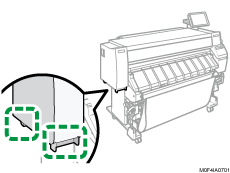
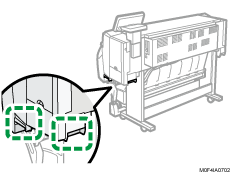
Grip the handles firmly before moving the machine.
Front and left view
Rear and right view
After moving the machine, use the caster fixtures to set it in place. If the floor is not level, the machine may need to be leveled. Contact your service representative, who can provide leveling for a fee.
When using @Remote, disconnect its ethernet cable before moving the machine. Move the @Remote adapter to a location where it can be connected to the machine. Connect the cable correctly to the port as before, and plug its AC adapter to the wall outlet.