
How to Use the Address Book
Register the User (authentication information) to the address book.
User
To allow only authenticated user access to the machine, register the login user name and password to authenticate the user.
You can add users to a group. You can create groups in a hierarchical structure.

Address Book data is stored on the hard disk. It can be lost if there is some kind of hard disk failure.
The manufacturer shall not be held responsible for any damages resulting in data loss.
Contact a customer engineer to configure the machine to periodically back up the address book automatically.
How to Use the Buttons of the Address Book
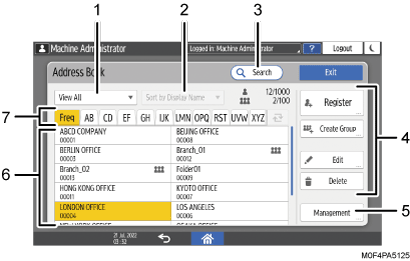
Filter
Apply a filter to users by using User Code, Group, or Authenticated User, and display the result as a list.
Sort
Sort the list of users in order of display priority, registration number, or name. If this function is disabled, press [Switch Title] (
 ).
).Search
Enter a string to search in the User, or Group.
Select the type of word to search for from "Name", "Registration No.", and "User Code".
Registered content modification keys
Press to register, edit, or delete an entry in the address book.
Management
You can create a backup or restore the address book. You can also edit the index in the address book or delete the registered information in a batch.
User list
Displays the list of registered users or groups. The registration number is displayed below the name. The icons have the meanings indicated below.
Icon
Meaning

Group
Switch title
Switch the user by title. Specify titles 1–3 when registering. To switch title, press [Switch Title] (
).
Items Registered in the Address Book
Name
Register the name of a user, registration number, and title.
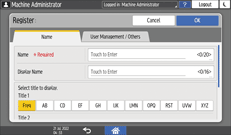
User Management / Others
Register the group that the registered user belongs to, and specify the protection settings and authentication information.
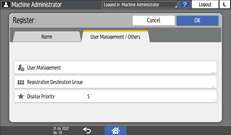
In "User Management", specify basic authentication, LDAP authentication, or authentication information used for user code authentication.

You can register, change, or delete the information in the address book using Web Image Monitor.