
Clean Print-heads
Use this function to clean the print-heads if a specific color is not printing or prints out unclearly.
Perform this function on a color basis.

Head cleaning consumes ink. Perform this function only when necessary.
Perform no other operations during head cleaning.
Cleaning may be incomplete if ink in a cartridge gets too low or runs out during cleaning.
An error will occur and head cleaning will not be possible if:
There is a misfeed.
One of the machine's covers is open.
The machine is performing maintenance operations.
The machine has run out of ink.
The machine has run out of paper.
The ink collector unit is full.
 Press [Settings] on the Home screen.

 Press [Maintenance]
 [Clean Print-heads].
 Select the color of the head you want to clean, and then press [OK][Start].
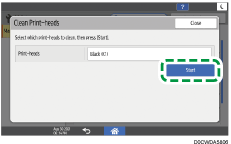
 Press [Exit].
To check the results of head cleaning, print the test pattern.
 Press [Home] (
 ) after completing the operation.

If a nozzle still fails to start firing, perform head cleaning again. For details about checking the condition of the print-heads, see Checking Whether a Nozzle Is Clogged.