
Confirming the Counter for Each User
When User Code authentication is activated on the machine, you can confirm the usage status of the Copier, Printer, and Scanner functions on an individual user basis.
Confirming/Clearing/Printing the Counter for Each User
 Log in to the machine as an administrator on the control panel.
 On the Home screen, press [Settings].
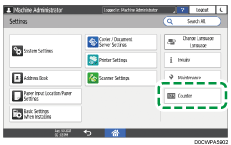
 On the Settings screen, press [Counter].
 Press [Display/Clear/Print Counter per User], and then select a counter.
 Confirm, clear, or print the counter.
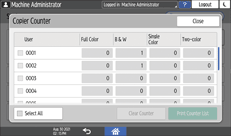
To clear the counter
Select a user.
To clear the counters of all users, select [Select All].
Press [Clear Counter].
Confirm or select the counter type, and then press [OK].
To print the counter
Select a user.
To print the counters of all users, select [Select All].
Press [Print Counter List].
Confirm or select the counter type, and then press [OK].
 Press [Close] three times.
 Press [Home] (
 ), and then log out of the machine.