
Preventing Data Leaks from Printed Sheets
Confidential or private information printed on paper may be copied improperly or stolen, leading to data leaks.
The following functions in the machine can promote user awareness of file management and discourage unauthorized copying or leaving of printed sheets.
Adding the name of the user printing the job on printed sheets (Compulsory Security Stamp)
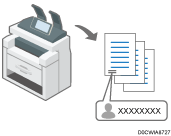
Always adding a printed name can promote user awareness of file management.
Warning unauthorized copying (Unauthorized Copy Prevention/Data Security for Copying)
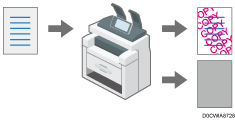
You can add specified text to documents printed in the machine. See the sections below for details about the function:
Applying the Unauthorized Copy Prevention Function When Printing
You can enable these functions even if users do not use them.
Specifying the Compulsory Security Stamp Function
Specify the location to stamp user information such as a login user name.
Compulsory Security Stamp can be used with the Copier and Document Server functions.
 Log in to the machine as the machine administrator on the control panel.
 On the Home screen, press [Settings].
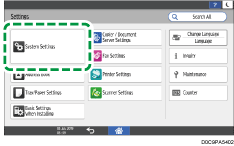
 On the Settings screen, press [System Settings].
 Press [Settings for Administrator]
 [Security Pattern/Stamp] [Compulsory Security Stamp: (function name)].
 From the list next to Compulsory Security Stamp: (function name), select [On], and then specify the stamp information and position.
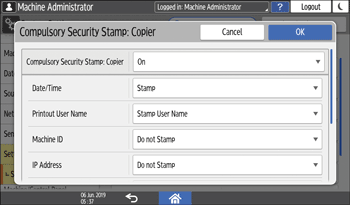
Date/Time: Prints the job output time.
Printout User Name:
Stamp User Name: Prints the name in the address book.
Stamp Login User Name: Prints the user code or login user name in the authentication information in the address book.
Machine ID: Prints the serial number of the machine. You can view the serial number by pressing [Settings]
[Inquiry].IP Address: Prints the IP address of the machine.
Stamp Position: Select the stamp position.
Adjust Stamp Position: Enter a value or adjust the position by pressing the arrow button.
 Press [OK].
 Press [Home] (
 ), and then log out of the machine.
Specifying the Unauthorized Copy Prevention Function
Make settings for discouraging or preventing unauthorized copying, such as pattern printing.
Log in to the machine as the machine administrator on the control panel.
On the Home screen, press [Settings].
On the Settings screen, press [Printer Settings].
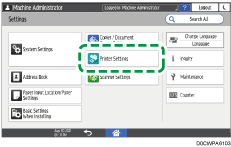
Press [Unauth. Copy Prevent. Settg.]
Specify the unauthorized copy prevention function.
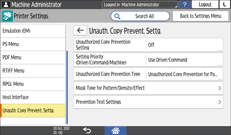
Unauthorized Copy Prevention Setting: Select whether to enable unauthorized copy prevention.
On:
Enables the unauthorized copy prevention function specified in the machine regardless of the settings on the printer driver.
Off:
Disables the unauthorized copy prevention function specified in the machine. If the unauthorized copy prevention function is specified in the printer driver, the machine performs print jobs according to the specified settings.
Setting Priority (Driver/Command/Machine): Select the contents of unauthorized copy prevention and their priority.
Use Driver/Command:
The added pattern is not printed. Specify the unauthorized copy prevention function on the control panel or in the printer driver as necessary.
Driver/Command (Most Settings):
The settings specified in the machine are applied to the mask type for pattern, density, and the settings specified on the control panel or in the printer driver are applied to the other items.
Machine Setting(s):
The settings specified in the machine are applied to printing.
Unauthorized Copy Prevention Type: Select the type of unauthorized copy prevention.
Data Security for Copying:
Protects documents by printing a gray pattern when making unauthorized copies.
Unauthorized Copy Prevention for Pattern:
Adds text or a pattern to unauthorized copies of documents. When you select an unauthorized copy prevention pattern, you need to specify Mask Type for Pattern/Density/Effect.
Mask Type for Pattern/Density/Effect: Specify the effect, mask pattern, density, and so on.
Mask Type for Pattern: Select from among 10 types.
Pattern Density: Select one of 3 levels of gradation.
Data Security for Copying Effect: Specify a combination of text and a pattern.
Unauthorized Copy Prevention of Patterns Effect: Specify a combination of text and a pattern.
Prevention Text Settings: Specify the pattern text from among one of the standard text strings, such as "Unauthorized Copy", the user name, the file name, the date and time, the user text strings, and so on. You can specify the font, point size, carriage return space, angle, and text position for the selected text string, as well as whether to repeat the text string.
Press [OK].
Press [Home] (), and then log out of the machine.

To prevent copying of documents with the embedded text for Data Security for Copying, press [System Settings]
[Settings for Administrator][Security Pattern/Stamp][Detect Data Security for Copying], and then specify [On]. When the Detect Data Security for Copying function is active, the contents of a document with the embedded text for Data Security for Copying are grayed out in the event that the document is scanned for copying or storing in the Document Server by the Copier or Scanner function.