
Specifying the Orientation of the Original
To display the scanned pages in the correct vertical orientation on the computer, specify the correct original orientation on the control panel according to the orientation of the original placed on the machine.
 Press [Scanner] on the Home screen.
 Press [Send Settings] on the scanner screen.

 Press [Scan Size], and select the scan size.
You cannot specify the original orientation when [Auto Detect] is selected for the scan size.
 Press [Original Orientation], and select the orientation of the original.
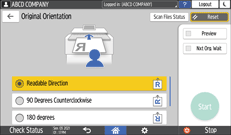
Referring to the figure displayed on the screen, specify the correct original orientation.
To read the scan data of a color or grayscale original in TIFF or JPEG format, place the original as shown below.
Orientation to place the original
The setting to specify in [Original Orientation]

Readable Direction