
Deleting a User from the Address Book
When a registered user no longer uses the machine, delete the user from the address book.
 Press [Address Book] on the Home screen.
 Select the destination to delete on the Address Book screen.
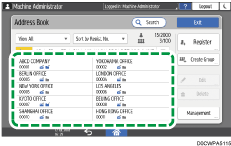
You can delete multiple users at one time.
 Press [Delete] to delete the user information.
 Press [OK].
 When deleting is complete, press [Home] (
 ).
).
 When a message prompting you to back up the address book appears on the screen, press [Go to Backup] to back up the address book.
If a message prompting you to contact the administrator to back up the address book appears on the screen, ask the administrator to back up the address book.
If you select [Close], you can close the address book without backing up and go back to the Home screen.