
Changing the Default Value of Each Function
You can change the default values of the items to specify on the Copy or Scanner screen.
The settings return to their default values when the machine is turned on or when the machine is left without being operated for a specified period of time. You can simplify the operations of each function by changing the default values of the scan and print settings to the frequently-used values.
You can prohibit users other than the machine administrator from changing default values.

You cannot register the default values for the following settings:
Copy
Orientation of [Combine]
Scanner
[Sender], destination, [PDF Security Settings], [Start Number]
 On the Copy or Scanner screen, select the setting to use as the default value.
 Press [Menu] (
 )
)  [Set Current Settings as Default].
Example: Copy screen
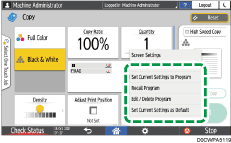
To restore the factory default settings, press [Reset Default to Factory Default].
If you restore the factory default settings in the [Scanner] screen, the history of destinations can also be deleted.
 Press [Program], and then press [Exit].
 After completing the configuration, press [Home] (
 ).
).