
Erasing Documents from Document Server
Erase unnecessary documents from the document server.
 On the Home screen, press [Document Server].
 On the document server screen, select the folder containing the document to erase.
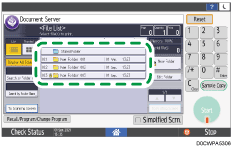
Press [Search by Folder No.] or [Search by Folder Name] to search for a folder.
If you select a password-protected folder, enter the password, and then press [OK].
 Select the document to erase, and press [Delete File].
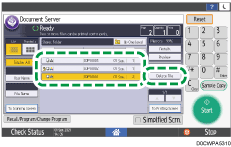
Press [User Name] or [File Name] to search for a document.
If the document is password protected, enter the password and press [OK].
 Press [Yes].