
Adjusting Transfer Voltage
Use [Adjust Transfer Voltage] to specify the transfer roller voltage for printing on the selected paper type. If the printed image is too light, increase the voltage for the paper you are using. If the printed image is mottled or blotchy-looking, decrease the voltage for the paper you are using.
 Press [Settings] on the Home screen.
 Press [Maintenance]
 [Adjust Transfer Voltage].
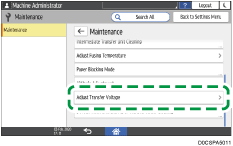
 Select the paper type.
 Specify a temperature between -1000 V and 2000 V.
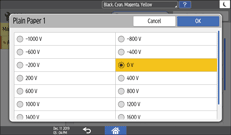
 Press [OK] twice.
 Press [Home] (
 ) after performing the adjustment.