Making a Backup Copy of or Restoring User Data
You can save a backup copy of the user data stored on the internal storage (eMMC) of the machine to a USB flash memory device in case of possible data loss. You can restore the stored data to the machine from the USB flash memory device.
When the machine is equipped with the SSD option, you cannot make a backup copy of or restore the user data.

The data stored on the eMMC may be lost if the power to the machine is kept turned off for an extended period of time. If you back up the user data in advance, you can restore the data even if the data stored on the machine is lost. Therefore, as a guide, when you intend to keep the power turned off for one year or longer, be sure to save a backup copy of the data in advance.
If you use the machine during the time from after you back up the user data until before you start restoring it, you may not be able to restore the user data because the saved data will no longer correspond to the machine's data. Therefore, save the backup copy of the user data immediately before you put the machine in long term storage with the power turned off. Also, after the machine has been stored for a long time, do not use it immediately, first, restore the user data.
Depending on the size of the user data, backing up or restoring it may take an extended period of time. Make sure that you have sufficient time before making a backup copy of or restoring user data.
Turning the main power off and then on, while the process for backing up or restoring user data is in progress, restarts the machine successfully without corrupting the user data. However, the process for backing up or restoring the user data starts all over from the beginning.
Once a USB flash memory device is used to store a backup copy of the user data, it cannot be used on any other device because the user data is encrypted before it is stored onto the USB flash memory device. To use the USB flash memory device on another device, you must format the memory device to delete the stored user data.
Before making a backup copy of or restoring user data, be sure to disconnect the LAN cable and the modular cable so that the machine will not receive jobs from an external source. Also, make sure that there is no stored reception files or originals waiting to be sent on the machine.
Before you start saving a backup copy and after you finish restoring the user data, turn off the machine, and then turn it back on.
Depending on the settings for [Auto Delete File in Document Server], documents saved in the document server are deleted automatically after a specified period. You cannot save a backup copy of or restore the documents to be deleted automatically because the documents cannot be stored for an extended period of time. Delete the documents to be deleted automatically or execute [Delete All Files in Document Server] before you start saving a backup copy.
Make sure that there are no stored reception files or originals waiting to be sent on the machine, and then disconnect the LAN cable and the modular cable.
Turn off the machine, and then turn it back on.
Log in to the machine as the as the machine administrator on the control panel.
Logging in to the Machine as an Administrator
When custom-privileges administrators are registered, you can log in to the machine as a custom-privileges administrator with the Data Management privilege as well.
Logging in to the Machine as a Custom-Privileges AdministratorOn the Home screen, press [Settings].

Press [System Settings].

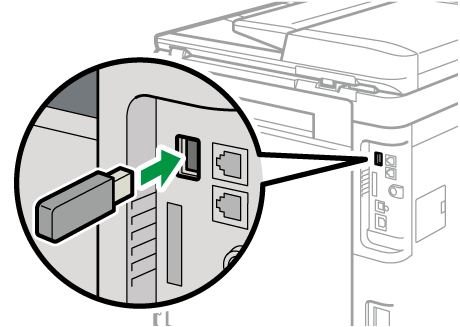
Insert a USB flash memory device into the USB Interface Type A slot on the rear of the machine.
Press [Settings for Administrator]
 [Data Management] [Backing Up User Data].
Press [OK].
After the export is completed, press [Exit].
Press [Home] (
 ), and then log out of the machine.
Make sure that there are no stored reception files or originals waiting to be sent on the machine, and then disconnect the LAN cable and the modular cable.
Log in to the machine as the as the machine administrator on the control panel.
Logging in to the Machine as an Administrator
When custom-privileges administrators are registered, you can log in to the machine as a custom-privileges administrator with the Data Management privilege as well.
Logging in to the Machine as a Custom-Privileges AdministratorOn the Home screen, press [Settings].
Press [System Settings].
Insert a USB flash memory device into the USB Interface Type A slot on the rear of the machine.
Press [Settings for Administrator]
[Data Management] [Restoring User Data].Press [OK].
After the export is completed, press [Exit].
Press [Home] (
), and then log out of the machine.Turn off the machine, and then turn it back on.