Registering the Realm
A realm is the network area in which Kerberos authentication is used. To use Kerberos authentication as the authentication method for LDAP authentication, register the Realm to identify the network area.
Register the realm name and KDC (Key Distribution Center) server information.
Log in to the machine as the machine administrator on the control panel.
Logging in to the Machine as an Administrator
When custom-privileges administrators are registered, you can log in to the machine as a custom-privileges administrator with the Authentication/Charge privilege as well.
Logging in to the Machine as a Custom-Privileges AdministratorOn the Home screen, press [Settings].

Press [System Settings].

Press [Settings for Administrator]
 [Authentication/Charge] [Administrator Authentication/User Authentication/App Auth.] [Register/Change/Delete Realm].
Select a Not Registered item, and then press [Register/Change].
Enter the information for the Realm to register.
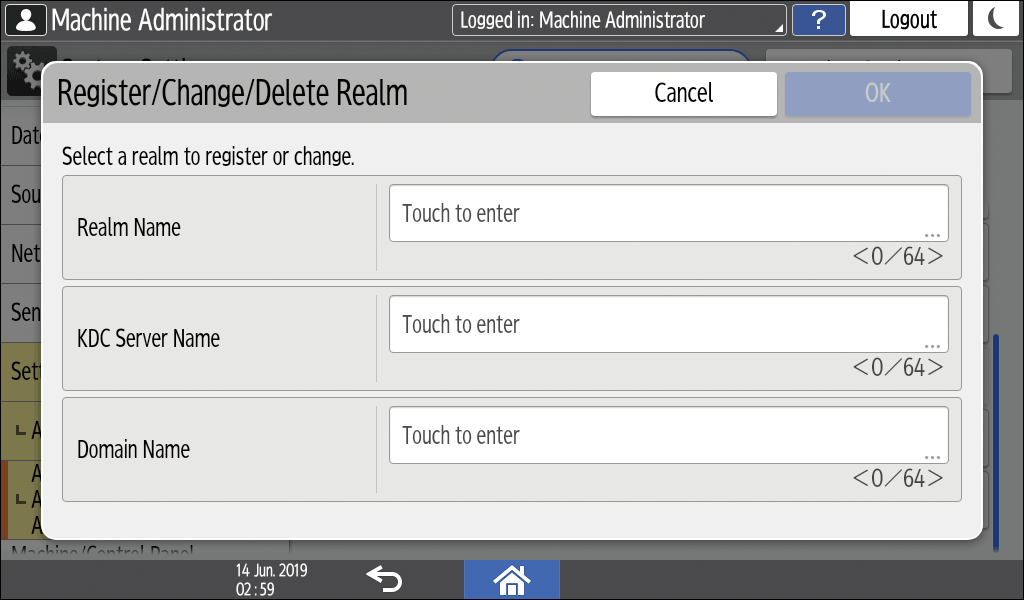
Realm Name: Enter the realm name or host name. Be sure to enter the realm name in uppercase letters.
KDC Server Name: Enter the host name or IP address of the KDC server.
Domain Name: Enter the domain name or host name corresponding to the realm name if the domain name should be specified according to the network environment.
Press [OK].
Press [Close].
Press [Home] (
 ), and then log out of the machine.

To change or delete the registered realm name, select the desired realm name, and then press [Register/Change] or [Delete] in step 5.