Printing an Information on the Received Fax
You can print information on the printed pages of a received fax for filing and sorting.
Printing the reception time
Prints the reception time and document number in the bottom margin of the received fax.
This is printed only on the last page when dividing and printing over multiple pages.
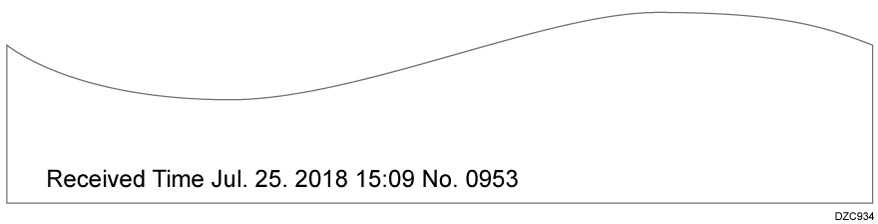
Configure the printing functions in [Reception Settings] under [Fax Settings].
Press [Settings] on the Home screen.

Press [Fax Settings] on the Settings screen.

Press [Reception Settings]
 [Reception File Print Settings] [Print Reception Time].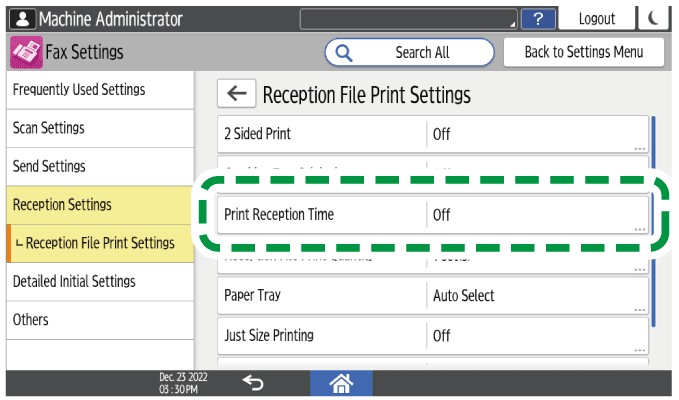
Select [On].
Press [OK].
Press [Home] (
 ) after specifying the settings.
You can print the sender name (for display), sender fax number, or e-mail address that is registered in the device at the origin on the received fax. Even if the sender has sent the document while specifying not to print the sender's name (for print), you can easily identify its origin.
Enable the sender information print function in [Parameter Setting] under [Fax Settings].
Press [Settings] on the Home screen.
Press [Fax Settings] on the Settings screen.
Press [Detailed Initial Settings]
[Parameter Setting] [Parameter Setting].Select bit number [3], switch number [02], and change current value to "1".
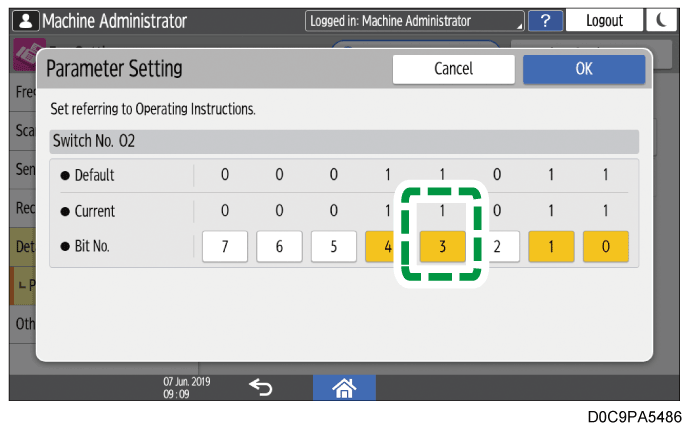
Press [OK].
Press [Home] (
) after specifying the settings.