
Registering a Destination E-mail Address or Folder

When the Central Management function is in use, the address book is managed by the server and [Prg. Dest.] is not available on the control panel of the machine. When registering destinations, consult your administrator.
For details about Central Management, see "Administrator Tools", Settings.
 When Using the Scanner Application
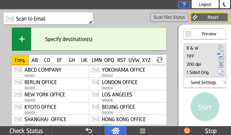
About how to use the application's screen, see "[Scanner] (standard) Screen".
 When Using the Scanner (Classic) Application
For details about how to use the Classic Scanner function, see Procedure for registering a destination in the address book manually (classic).
For details about how to use the Classic Scanner function, see Procedure for registering a recently used destination in the address book (classic).