Thick Paper Orientation and Recommended Status
When loading thick paper of 106-216 g/m2 (Approx. 28 lb. Bond–80 lb. Cover) in the paper trays, or in the bypass tray, follow the recommendations below to prevent misfeeds and loss of image quality.
See the following for the paper thickness that can be loaded in each tray.
Recommended Paper Sizes and Types
Paper Orientation
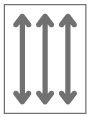
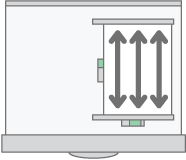
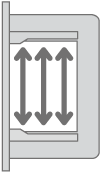
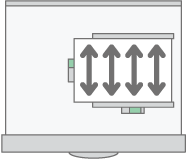
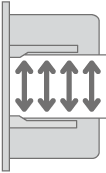
Thick paper has a paper direction according to its grain. Set the paper direction according to the grain, as shown in the following diagram:
Direction of paper grain
Tray 1–4
Bypass Tray
Longitudinal direction
Lateral direction

Paper Storage
Temperature: 20–25°C (68–77°F)
Humidity: 30–65%.
Do not use together paper that has been stored in different environments.
Minimum Number of Sheets
- 20 sheets or more (paper trays of the machine/optional lower paper tray unit used)
After loading paper, position the side fences flush against the paper stack.

When printing on thick, smooth paper, be sure to fan the paper thoroughly before loading. If you do not fan thick paper, jams and misfeeds can occur. If paper continues to become jammed or feed in together even after they are fanned, load them one by one from the bypass tray.
Proper performance and quality may not be achieved under the recommended conditions depending on the paper.
The printed sheet may curl. If the printed sheet curls, correct it.