Placing an Original on the Exposure Glass
Use the exposure glass to scan originals that cannot be placed in the auto document feeder (ADF), such as books and license cards.

|

Originals that are larger than the exposure glass may become damaged if you place them on the exposure glass. Place the originals not to overwrap the the paper size indication.
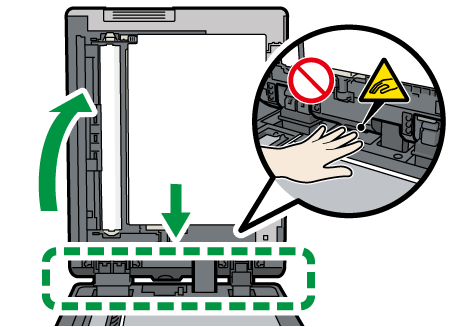
When you open the ADF, do not touch the parts shown below. Your hands or fingers are caught, which can result in injury.
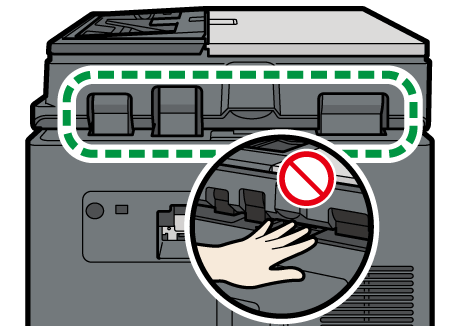
Do not lift the ADF forcefully. The cover of the ADF might open and cause injury. The ADF, or its hinges may also become damaged.
Lift the ADF.
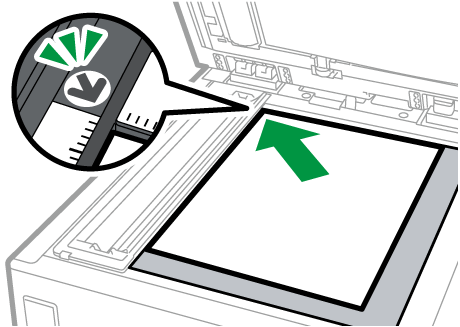
Lift the ADF by more than 30 degrees to detect the document size automatically when placing an original on the exposure glass.Place the original face down and aligned to the mark on the upper left corner of the scan area.
Recommended Original Size and Weight
Sizes Detectable with Auto Paper SelectLower the ADF.

When you place a thick book or three-dimensional original on the exposure glass and lower the ADF, the back side of the ADF rises up to accommodate the original.
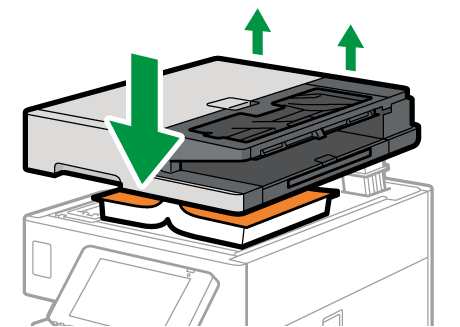
Do not open or close the ADF with your hands placed in the space between the ADF and exposure glass.