Cleaning the Machine
Smears or dust may appear on copied documents or scanned images when the exposure glass, scan glass, or ADF becomes dirty. Clean those parts.

|

Do not use chemicals such as cleaning liquid and organic solvents such as paint thinner and benzene for cleaning. It may seep inside the machine through the gaps or melt the plastic material composing the exterior cover, causing malfunctions to occur.
Your service representative will replace the ozone and dust filters as needed.
Use the cleaning cloth provided with the machine to wipe the parts.
Do not close the ADF while hard objects are placed on the scanning glass. Doing so may damage the machine.
Wipe the exposure glass and the scanning glass.
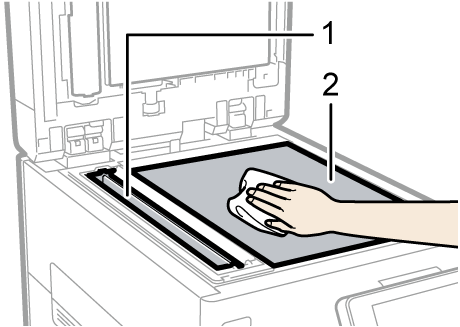
Scanning glass
Exposure glass
Use a dry soft cloth to wipe the part.
When using the one-pass duplex scanning ADF
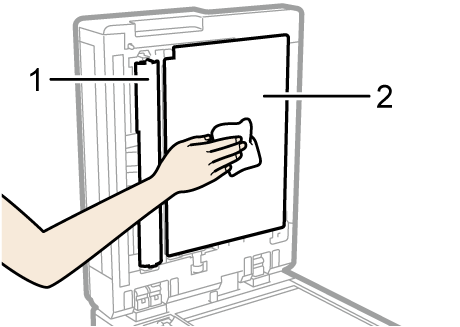
Wipe the sheet and guide plate of the one-pass duplex scanning ADF.
Guide plate
Sheet
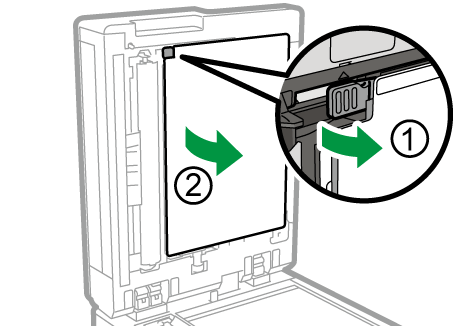
Pull the lever (1) and open the sheet (2).
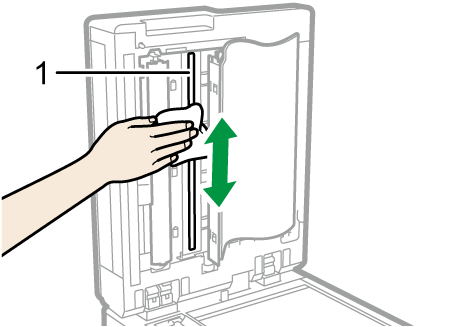
Wipe the scanning glass.
Scanning glass
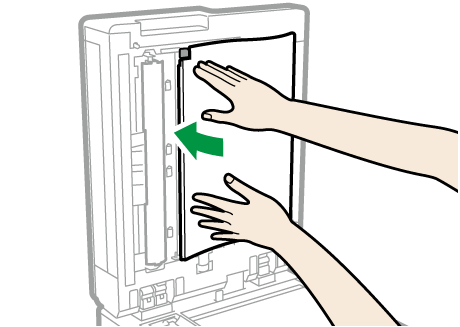
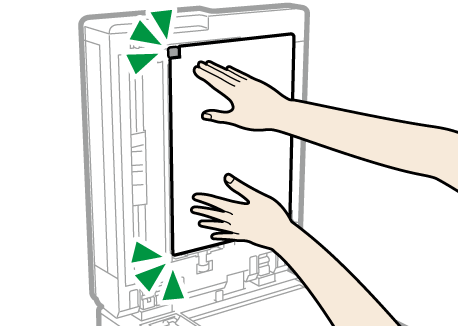
Press the both ends of the sheet, and then return it to its original position.
Hold the sheet until it clicks.

If dirt does not come off when wiped with a dry cloth, use a cloth that has been soaked in water and thoroughly wrung out.
If dirt does not come off even when wiped with a wet cloth, use neutral detergent and use a dry cloth to wipe off any moisture.