
Specifying the Environmental Settings According to the Install Location of the Machine
Specify [Environment Setting] in [Settings] [Machine Features Settings][Maintenance].
Permissible Temperature and Humidity Range
The machine uses the temperature sensor to automatically configure settings that are suitable for the temperature and humidity of the location in which it is installed.
The white area in the graph below is the permissible temperature and humidity range for the machine. When you use the machine in the environment within the white range, you do not have to change the setting from the factory default, [Auto Control].
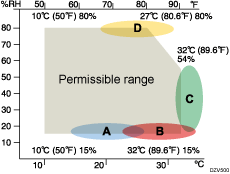
If you are using the machine in an environment within A, B, C, or D, which are out of the range of permissible temperature and humidity, set up the items according to the following table.
Environment | Item |
|---|---|
Area A | [Environment A] |
Area B | [Environment B] |
Area C | [Environment C] |
Area D | [Environment D] |
When toner dust appears on printouts in area A | [Special 1] |
When white spots appear on printouts in area D | [Special 2] |
Permissible range | [Auto Control]*1 |
*1 The machine controls itself automatically using the temperature sensor.
 Press [Settings] on the Home screen.
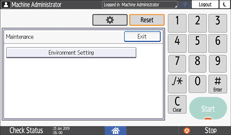
 Press [Machine Features Settings][Maintenance][Environment Setting].
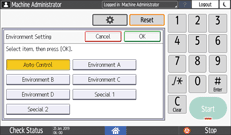
 Select an item according to the environment, and press [OK].
 Press [Home] (
 ) after performing the adjustment.